10 Resume Mistakes That Get You Auto-Rejected | Careerkit
Home/Blog/Blog/10 Resume Mistakes That Get You Auto-Rejected
Blog
10 Resume Mistakes That Get You Auto-Rejected
The 10 resume mistakes that bury your application before a human ever sees it, plus the exact fixes recruiters and ATS software actually look for. Sourced from 2025 hiring data.
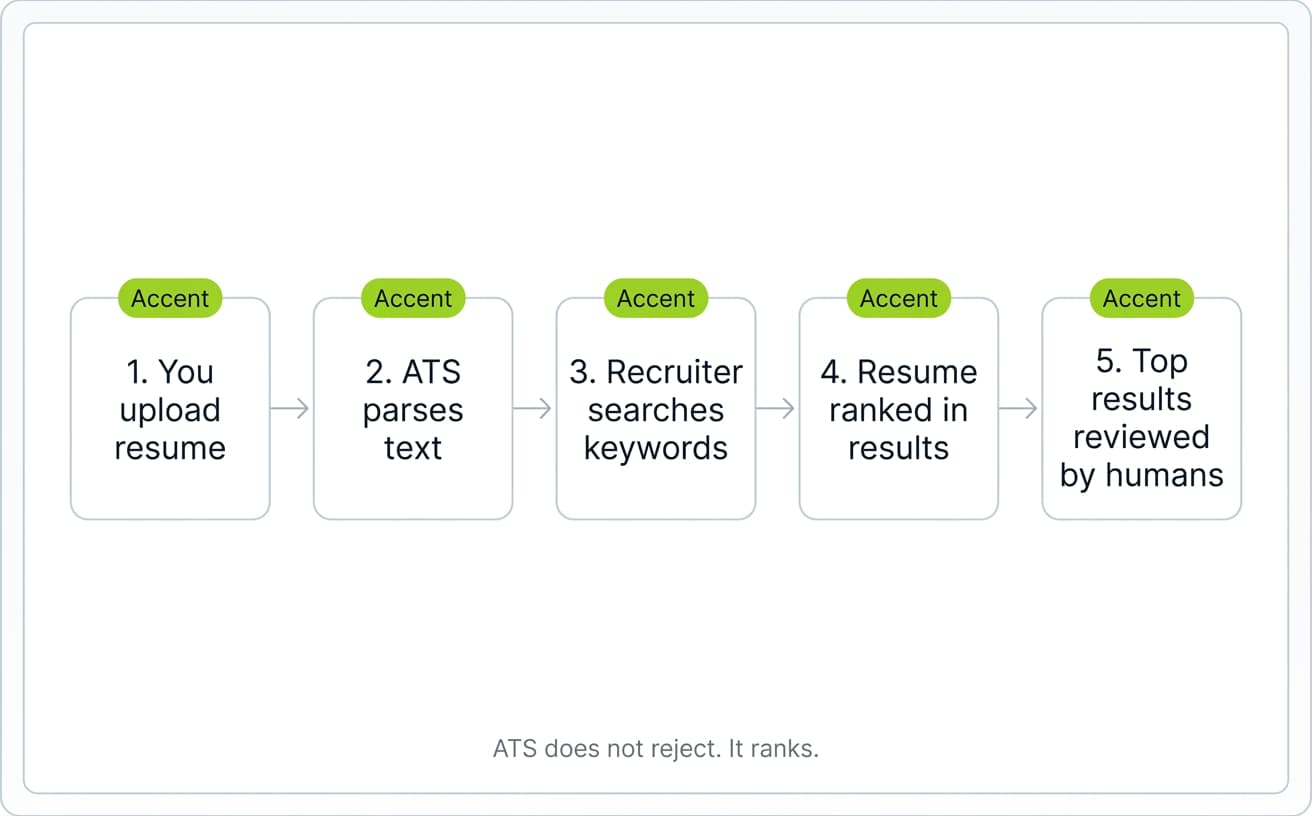
Your resume probably is not getting "rejected" the way you think. There is no robot stamping it with a red REJECTED. What actually happens is quieter: a recruiter searches their applicant tracking system for "Senior Marketing Manager Boston," and your resume does not surface in the top 50 results. You never hear back. The application looks rejected, but technically it was just buried.
Watch: why references don't belong on your resume (and what to do instead)
5 resume tips that actually get you interviews
A 2025 Enhancv study of 25 U.S. recruiters across tech, healthcare, finance, and manufacturing found that 92% of ATS platforms do not auto-reject resumes for formatting or design issues. They organize, rank, and surface candidates. Humans make the rejection call. The danger for job seekers is not a robot saying no. It is a recruiter searching for specific keywords and your resume not appearing.
That is why small mistakes hurt so much. According to a 2018 Ladders eye-tracking study cited by HR Dive, recruiters spend an average of 7.4 seconds on the initial scan of a resume. If a recruiter cannot find your title, your dates, and one or two relevant achievements in that window, you are out. And if your resume contains a typo, 77% of hiring managers will reject it on sight, per a CareerBuilder survey.
This article walks through the 10 most common resume mistakes that cause this kind of silent rejection, with the fix for each one. The goal is not to game an algorithm. It is to make your resume readable to both the software that organizes it and the human who decides on it.
Before a hiring manager sees your application, software has already parsed it, indexed it, and decided where it sits in a recruiter's search results. Understanding what that software does (and does not do) is the difference between writing a resume for a real reader and writing one for a myth. To learn how each section of your resume is read by both the software and the recruiter, our anatomy of a resume guide breaks it down section by section.
What an ATS is, and what it actually does
An applicant tracking system (ATS) is the database recruiters use to collect, organize, and search through job applications. According to Select Software Reviews, roughly 98% of Fortune 500 companies use one. Workday, Greenhouse, iCIMS, Lever, and SuccessFactors are the platforms you are most likely to encounter.
When you submit a resume, the ATS parses it into structured fields: name, contact info, work history, education, skills. It strips out formatting, images, and anything it cannot read as plain text. The recruiter then searches that database the way you would search Google. They type "5 years SaaS sales Boston" and the ATS returns ranked results.
The few cases where an ATS does auto-reject are tied to "knockout questions" you answer before submitting: things like work authorization, required certifications, or minimum years of experience. These rejections come from rules the recruiter set up, not from the software making a judgment call about your resume content.
The 7.4-second scan
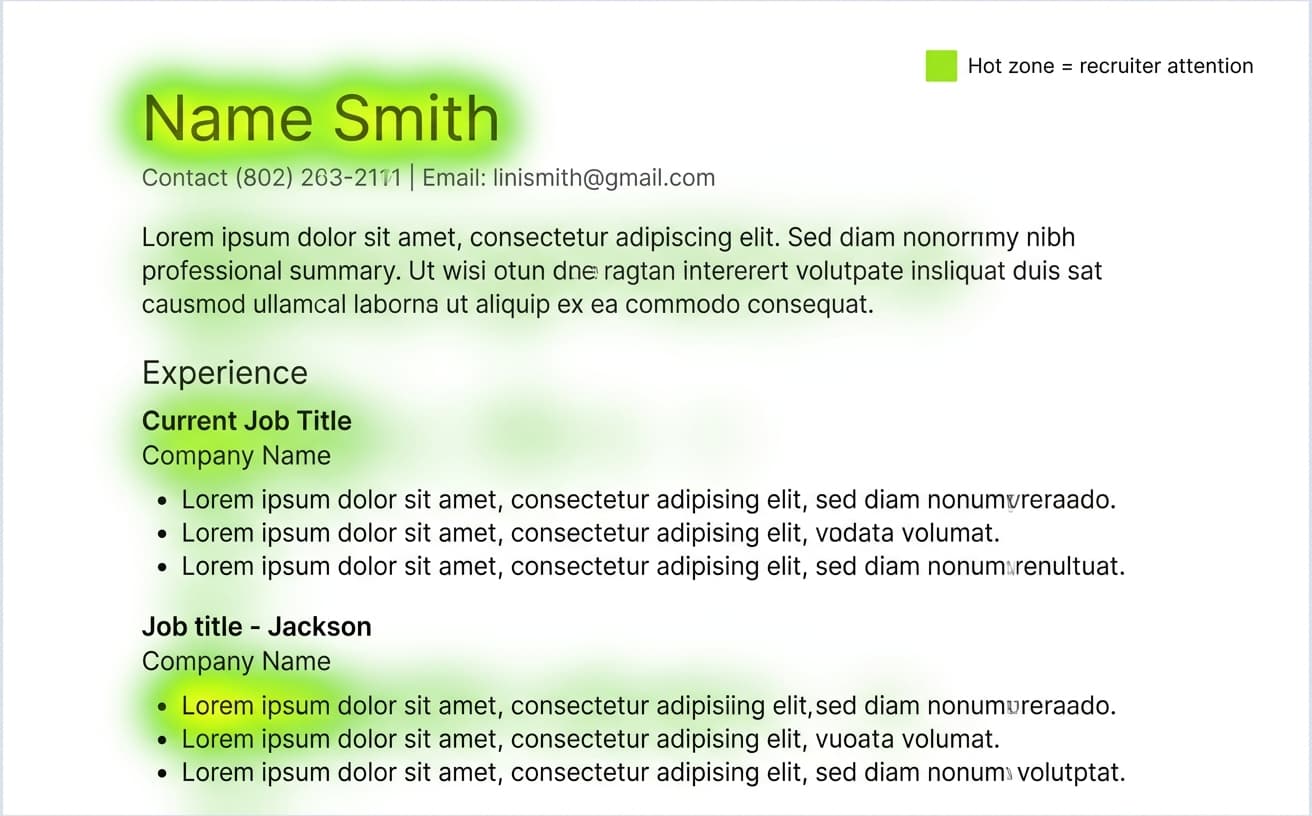
Once your resume surfaces in a recruiter's search results, you have about 7.4 seconds to keep their attention, according to the 2018 Ladders eye-tracking study reported by HR Dive. That is up from 6 seconds in their 2012 study, but still barely enough time to read a paragraph.
Eye-tracking heatmaps from the study showed recruiters scan resumes in an F-pattern: across the top, down the left margin, with most attention concentrated on your name, current title, current employer, and the first bullet point under your most recent role. Anything that does not fit cleanly into that pattern (long paragraphs, dense text, multi-column layouts) is mostly skipped.
Why formatting decides if you get parsed correctly
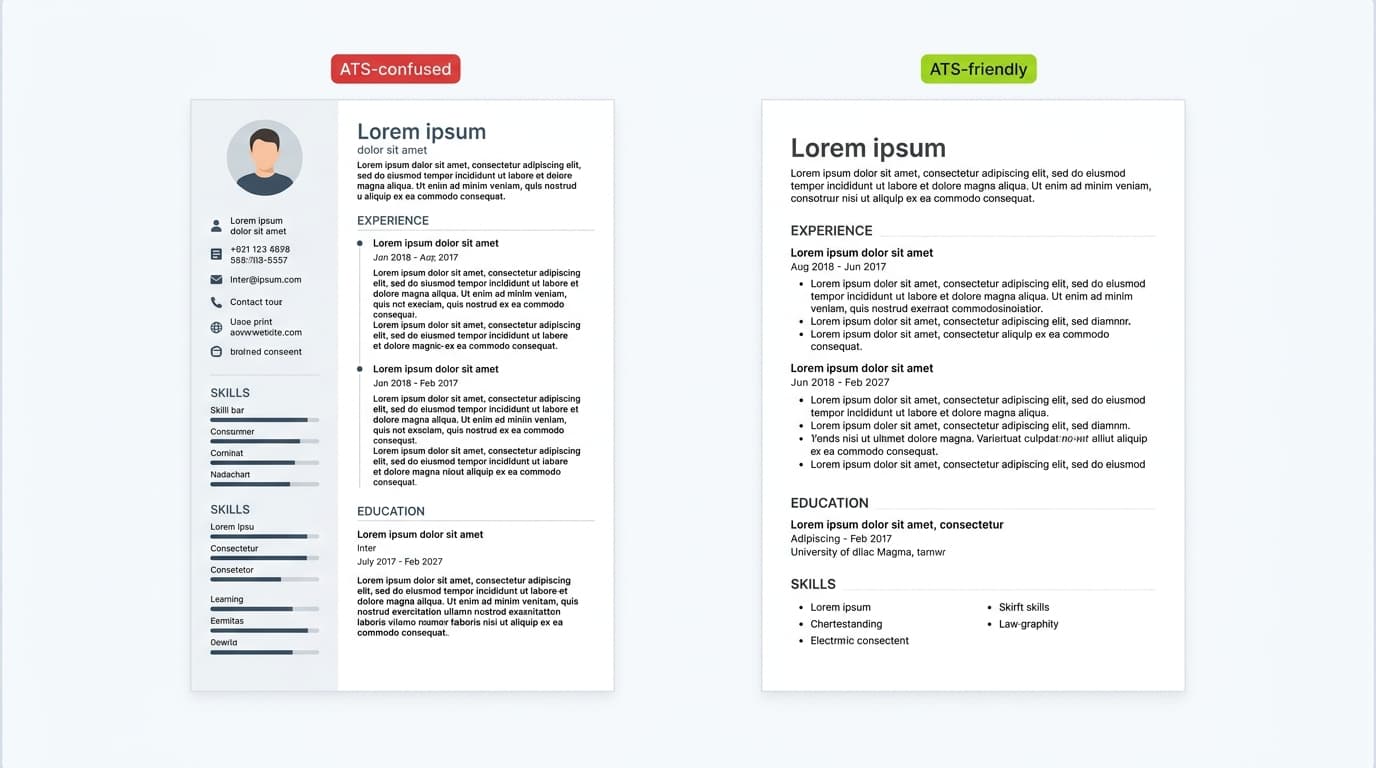
Formatting is not about looking pretty. It is about whether the ATS can correctly extract your information when it parses your file. A two-column layout with icons and a custom font might look great in Canva, but the parser often reads it as scrambled text, missing job titles, or empty experience fields.
The formatting choices that matter most are simple ones. Submit a .docx file by default, or a text-based PDF when the application allows it. Use a single-column layout. Set body text in a standard font like Arial, Calibri, Inter, or Times New Roman at 10 to 12 point. Label your sections with conventional headings (Experience, Education, Skills, not "My Journey" or "What I Bring"). And format every date as month and year. If you are not sure how your font choice will render after parsing, the resume font preview tool lets you test different options against a clean ATS-friendly template.
One detail catches a lot of candidates off guard: many ATS parsers cannot read content placed inside Word document headers or footers. If your name, email, and phone number are in the header, the ATS might extract a resume with no contact information at all. Always put contact details in the main body of the document.
10 Resume Mistakes That Quietly Bury Your Application
Most resume rejections are not dramatic. Your resume just does not surface in the recruiter's search, or it gets a 7-second skim and falls into the "no" pile. Below are the 10 most common mistakes that cause this. Each one is fixable in under 10 minutes, and most candidates have at least three of them on their resume right now.
1. Using tables, columns, or graphics
Designed resumes from Canva, Figma, or Photoshop look polished, but they often break ATS parsers. Multi-column layouts get read in the wrong order. Tables turn into text walls. Icons next to contact info disappear or show up as garbled characters.
Stick to a single-column layout, simple round or hyphen bullet points, and zero text boxes. Most parsers handle a clean .docx flawlessly. The same parsers fail on a beautifully designed PDF.
2. Saving in the wrong file format
The application form usually tells you what to submit. Read it. If it says .docx, do not upload a PDF. If it says PDF, make sure it is text-based and not a scanned image of a resume (which most parsers cannot read at all). When the format is not specified, .docx is the safest default because every major ATS reads it without issues.
Avoid .pages, .odt, .rtf, and screenshots saved as PDFs. These are the file types that quietly fail at parsing.
[KEEP THE EXISTING CTA BLOCK HERE - "Bereit fuer Ihren Traumjob?"]
A wrong file type does not just lower your match score. It often results in a resume the ATS cannot read at all, which means the recruiter sees a blank or near-blank profile.
3. Missing the keywords from the job description
Recruiters search the ATS with terms pulled directly from the job description. If those terms are not on your resume, you do not appear in the results. This is the single biggest reason qualified candidates get buried.
Pull the 8 to 12 most-repeated skills, tools, and qualifications from the job description and make sure they appear naturally in your summary, skills section, and experience bullets. Spell out acronyms the first time you use them, like "Search Engine Optimization (SEO)," because some parsers do not recognize standalone acronyms. If you need a starting list of relevant skills for your role, the resume skills generator gives you role-specific options pulled from real job postings.
4. Using creative or non-standard job titles
If your real title at your last job was "Chief Happiness Officer" or "Marketing Ninja," that is not what recruiters search for. They search for "HR Manager" or "Marketing Manager." A creative title means your resume never surfaces.
The fix is simple: list your official title alongside the standard industry equivalent in parentheses. For example: "Marketing Ninja (Senior Marketing Manager)." This keeps you honest about what your company called you while making sure the search-friendly version is on the page. For more examples of how to phrase your work history for both software and human readers, see our guide on work experience bullet points that get noticed.
5. Omitting dates or using inconsistent formats
Recruiters and ATS search filters expect month-and-year format on every job. Inconsistent dates make it harder for both to track your career progression at a glance, and a functional resume with no dates at all reads as a red flag for hidden gaps.
Pick one format and use it for every entry. Either "June 2021 - Present" or "06/2021 - Present" works. Mixing formats ("Summer '21 - now" alongside "June 2018 - June 2021") looks careless to a human and can confuse the parser.
Ready to land your dream job?
Join 50,000+ job seekers who have already transformed their careers with our AI-powered resume builder.



![Cover Letter vs Resume: What Hiring Managers Actually Read First [2026]](/_next/image?url=%2Fapi%2Fmedia%2Ffile%2Fcoverletterandresume.png&w=1920&q=75)