How to Create an ATS Friendly Resume: Pass Every Scanner in 2026 | Careerkit
Home/Blog/Guide/How to Create an ATS Friendly Resume: Pass Every Scanner in 2026
Guide
How to Create an ATS Friendly Resume: Pass Every Scanner in 2026
How to create an ATS-friendly resume that passes every scanner in 2026: the right format, keywords, and sections, plus a free template and ATS checker to test it.
The harsh reality is that most resumes never reach a human recruiter. While the often-cited claim that 75% of resumes are "rejected by ATS" has been debunked by a 2025 Enhancv study of 25 U.S. recruiters, the underlying problem is real. Poorly formatted, keyword-mismatched resumes get buried at the bottom of the pile where no recruiter will ever scroll. A resume optimized for ATS systems is not just helpful, it has become essential to succeed in today's job market.
What an ATS actually does with your resume
The numbers tell a compelling story. According to Jobscan's 2025 Fortune 500 ATS Report, 97.8% of Fortune 500 companies use an Applicant Tracking System, and Select Software Reviews reports that 75% of recruiters use an ATS or similar tech-driven tool to review applicants. Once your resume reaches a human reviewer, you have very little time to make an impression. A 2023 study by recruiting director Jan Tegze, which tracked 114 recruiters using analytics software, found the average review time ranged from 17 to 46 seconds, with 30 seconds as a realistic midpoint. Ladders' 2018 eye-tracking study found that recruiters' eyes go first to your current job title and company name, then to your previous role, then down to education.
This piece will help you overcome the ATS hurdles and land your resume on hiring managers' desks. You will learn the inner workings of these systems and discover how to use an ATS resume checker to test your document. The guide covers everything needed to create a resume that clears every scanner in 2026.
The statistics are eye-opening. ATS systems have become standard practice among nearly all large employers. Jobscan's analysis of all 500 companies on the Fortune list detected an ATS on 97.8% of their career pages in 2025. According to Harvard Business School and Accenture's "Hidden Workers" report, the most common automated filters screen for employment gaps (used by over 50% of companies), followed by skills keywords, education credentials, and job title matches. The strategies in this guide will help you pass those filters and land in front of an actual hiring manager.
An Applicant Tracking System (ATS) is nowhere near just a digital filing cabinet. By 2026, it works as a sophisticated recruitment nerve center that manages the whole hiring process from job posting to candidate onboarding. The original systems emerged in the late 1990s as on-premises software to process high volumes of applications. Today's ATS has evolved into a cloud-based AI-powered command center that turns hiring from guesswork into science.
How ATS works in modern hiring
Modern ATS platforms analyze applications through a combination of Natural Language Processing (NLP), machine learning, and Optical Character Recognition (OCR). A candidate's resume submission triggers the system into action through several key processes:
The system starts with resume parsing - it pulls out relevant information like contact details, work history, education, and skills. This data converts into a structured format the system can analyze. Modern parsing engines have become significantly more accurate, though performance varies by vendor and file format. Systems like Workday and iCIMS use a combination of NLP and OCR to extract structured data, though no single industry benchmark covers all platforms uniformly.
Smart scoring algorithms then review candidates against job requirements. Modern ATS platforms understand context and relationships between different skills, unlike early systems that used simple keyword matching. To cite an instance, they know that a Marketing Manager and Head of Marketing might represent similar roles.
On top of that, many systems use knockout questions - simple yes/no queries about essential qualifications that filter out candidates who don't meet minimum requirements.
Intelligent selection scoring marks the final stage, where candidates get rankings up to 100%. Companies typically advance candidates scoring between 70-100% to human review, though some hire applicants with match rates as low as 40%.
Modern ATS software handles interview scheduling, communication workflows, and offers analytics dashboards that turn recruitment data into useful insights. According to Select Software Reviews' 2026 ATS statistics roundup, 94% of recruiters say their ATS has had a positive impact on their organization's hiring process, and employers using an ATS report up to 60% faster hiring timelines.
Why most resumes fail the ATS test
The majority of resumes never surface to a human recruiter, despite all the technological advances. A 2025 study published on HR.com found that 92% of recruiters do not use auto-rejection in their ATS. Instead, the real problem is that resumes with poor formatting or weak keyword alignment get ranked so low that recruiters, who may be reviewing hundreds of applications, never scroll down far enough to see them. The good news is that the biggest problems are fixable formatting and content issues.
Poor formatting leads the list of rejection reasons. ATS systems have trouble with:
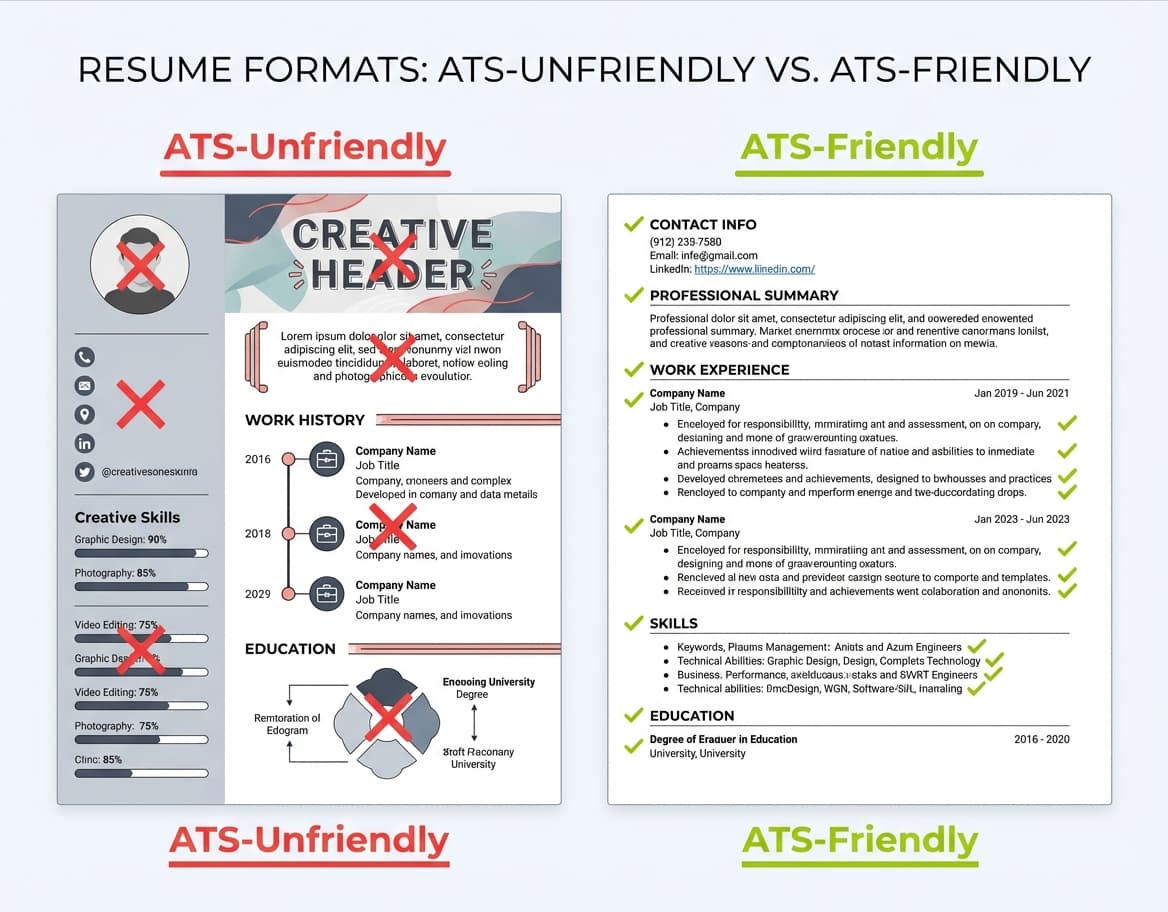
Resumes containing graphics, tables, or columns (these break formatting and lead to misinterpreted information)
Creative headers that confuse the system
Photos, icons, or logos, which ATS parsers cannot read and which often cause the system to skip or scramble surrounding content
Content placed in headers or footers
Keyword mismatch creates another major obstacle. The system looks for specific terms related to the job description. Your resume might get filtered out whatever your qualifications if it lacks these vital keywords. The tech industry faces this challenge acutely. According to CoverSentry's aggregation of ATS data from multiple sources, the overall interview rate across industries sits around 3% of total applicants, meaning competition for human review is fierce.
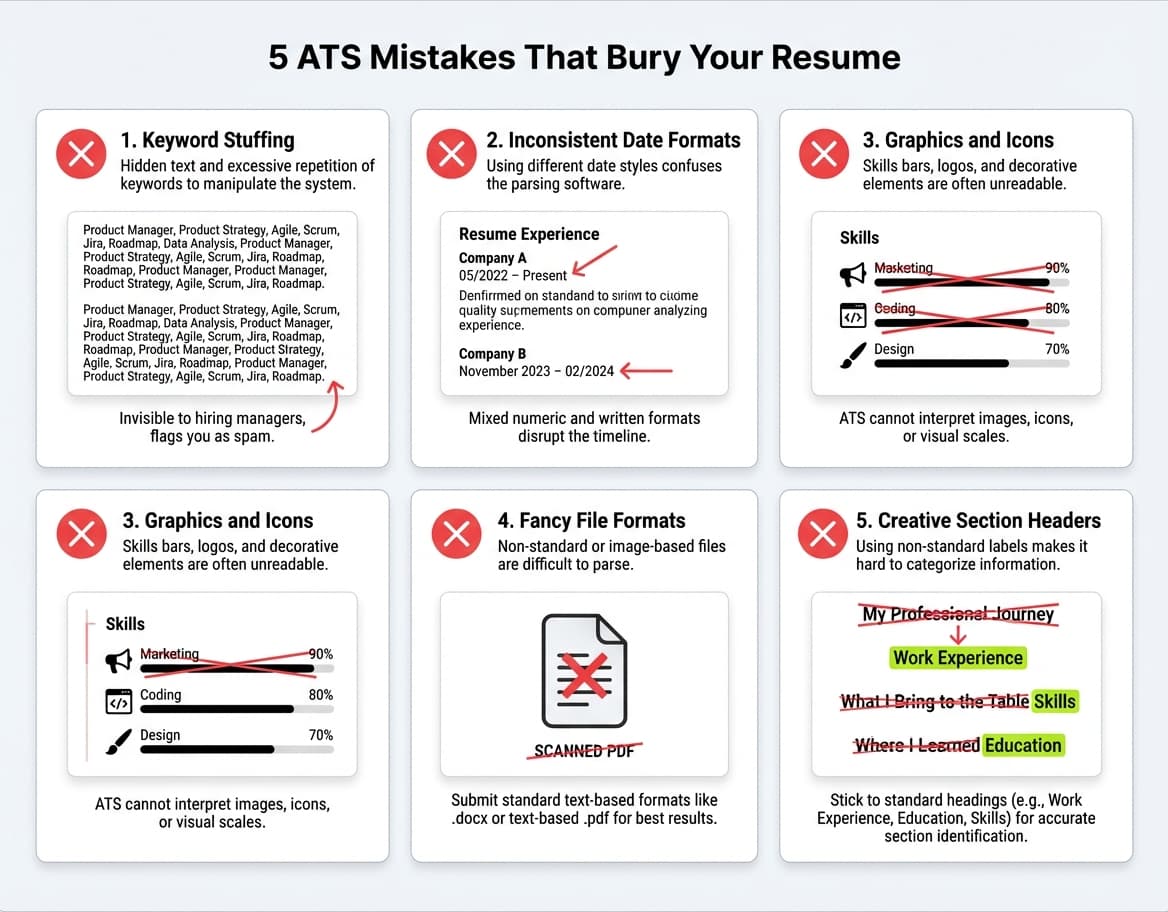
File format issues trigger rejections too. Many systems struggle with scanned PDFs or image-based files and prefer .docx or plain text formats instead. Your experience calculation can confuse the system if date formats aren't consistent.
Small details make a difference. According to a CareerBuilder survey reported by SHRM, the majority of hiring managers say they would automatically dismiss a candidate with typos or grammatical errors on their resume. Fancy fonts, too many bullet points, and non-standard section titles can all throw off ATS software.
This knowledge matters in 2026 because the vast majority of mid-size and large employers now route all applications through an ATS, and 97.8% of Fortune 500 companies use a detectable system according to Jobscan's 2025 report. Understanding how these platforms rank and surface candidates is no longer optional for serious job seekers.
Step 1: Use the Right Job Title and Keywords
The single most impactful thing you can do for your ATS score is align your resume's language with the job posting. This step covers three techniques: matching the job title, extracting both hard and soft skill keywords, and handling acronyms so no variation slips through the cracks.
Match the job title exactly
Keywords rule the ATS world. Job titles carry more weight in ATS systems than most job seekers realize. These systems scan titles first, and this substantially affects your visibility to recruiters. Many applications disappear into the digital void due to title misalignment.
To cite an instance, see what happened to one UX designer whose solid experience went overlooked. Her expertise in UX research and product design didn't help because her applications never reached hiring managers.
The biggest problem? Her vague titles like Self-Service Tools Associate and Product Implementation & Optimization Associate didn't register as design-related roles in the ATS.
A straightforward yet powerful solution emerged: she rephrased her titles to show her actual scope while staying truthful.
Here is what that title change looked like in practice:
Before (ATS could not detect design relevance): "Self-Service Tools Associate, Acme Corp, 2021-2024"
After (ATS immediately flags as a match for UX roles): "UX Researcher & Product Designer, Self-Service Tools, Acme Corp, 2021-2024"
Notice that the revised title keeps the original scope ("Self-Service Tools") for honesty, but leads with the functional role that ATS keyword filters are scanning for. This immediately signaled relevance to the ATS.
Here is another common example. A candidate applying for Operations Manager roles had this on her resume:
Before: "Manager of Customer Engagement"
After: "Manager of Customer Engagement - Call Center Operations & Training Lead"
The dash format preserves the original corporate title while adding the searchable terms that recruiters actually type into their ATS when looking for operations candidates. If you want help generating ATS-aligned titles based on your target job description, Careerkit's resume builder can suggest title rewrites automatically.
Corporate titles often don't translate well to external job markets. You have several legitimate ways to address this:
Add clarity in parentheses: Manager of Customer Engagement (Call Center Operations, Training)
Use a dash to show both internal and clarified titles: Manager of Customer Engagement Operational Support Lead
Standard job titles found in postings work best. The ATS gets confused by creative or unusual titles like Marketing Ninja or Sales Guru.
Identify hard and soft skills from the job post
Job descriptions are your ultimate keyword goldmine. Your ATS match rate improves when you read the job ad carefully and spot all key skills the employer wants.
Hard skills are technical abilities needed for the job like measurable competencies from education, training and practice. Soft skills reflect your personality traits like communication style or teamwork abilities.
Technical skills are necessary but not sufficient on their own. According to LinkedIn's 2019 Global Talent Trends report, 92% of talent professionals say soft skills matter as much or more than technical skills, and 89% say bad hires typically lack soft skills. A 2025 TestGorilla report covered by HRDive found that 60% of employers say soft skills are more important now than five years ago. Many candidates pack their resumes with technical jargon but fail to demonstrate teamwork, communication, and problem-solving abilities.
ATS match rates improve with a balanced approach because the system captures keywords from both categories. Your resume works better when you highlight both types of skills:
Hard skills: Programming languages, data analysis, certification names
Soft skills: Communication, collaboration, problem-solving, time management
Repeated terms in job postings reveal these skills. A senior sales representative position might stress strong communication skills, experience with CRM software, and data analysis. You'll impress both the ATS and human reviewers by highlighting both skill types.
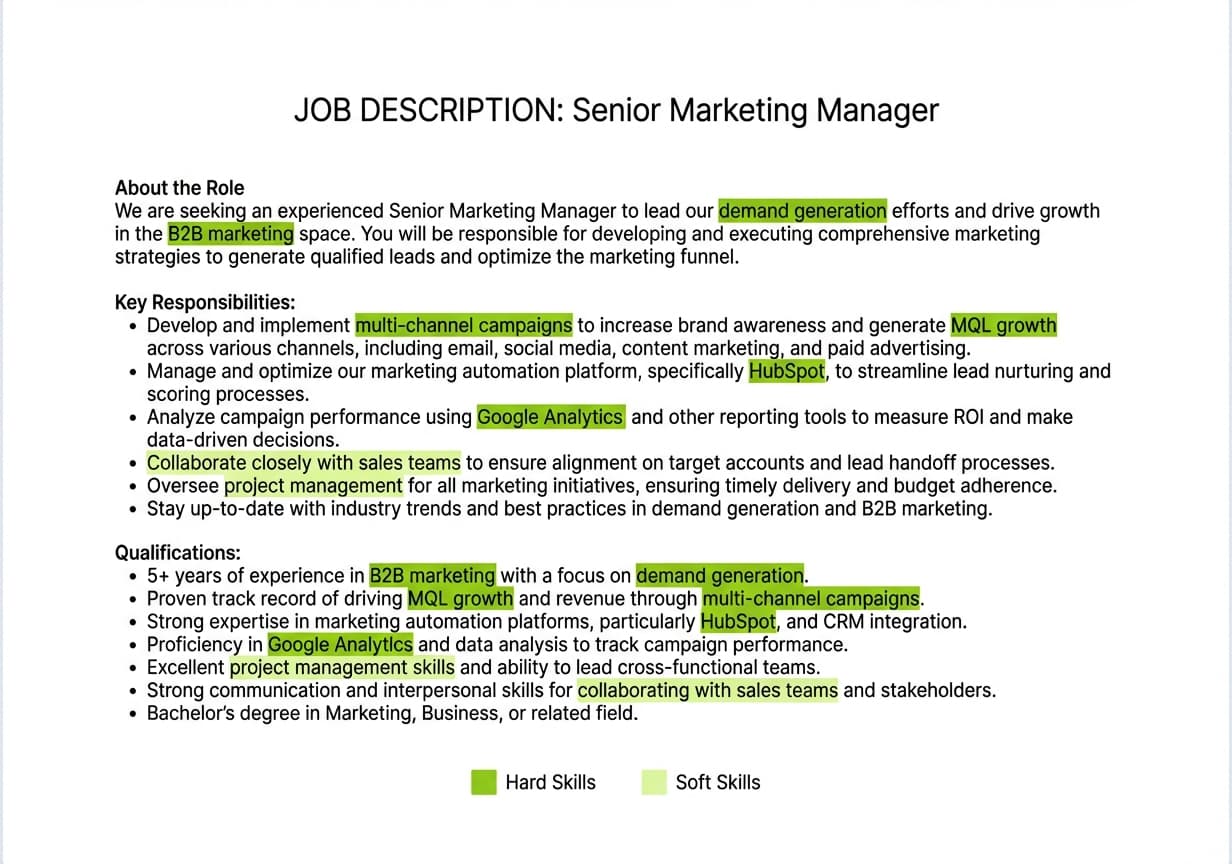
To see how this works in practice, consider this excerpt from a real Senior Marketing Manager job posting:
"We are looking for a Senior Marketing Manager to lead our demand generation strategy. The ideal candidate has 5+ years of experience in B2B marketing, proficiency in HubSpot and Google Analytics, and a track record of driving MQL growth through multi-channel campaigns. Strong project management skills and experience collaborating with sales teams are essential."
From this single paragraph, you can extract the following keywords to weave into your resume. The hard skills to include are: demand generation, B2B marketing, HubSpot, Google Analytics, MQL growth, and multi-channel campaigns. The soft skills to include are: project management, cross-functional collaboration, and sales alignment. Notice that "demand generation" and "MQL growth" are industry-specific terms that an ATS will scan for by exact match. If your resume says "lead generation" instead of "demand generation," you may lose points on the keyword match even though the meaning is similar. Always mirror the exact terminology from the job posting. For a faster approach, paste your target job description into Careerkit's skills generator to extract keywords automatically.
Use both acronyms and full terms
ATS systems don't always spot variations of the same term. So, including both the spelled-out version and its abbreviation helps you match the employer's search parameters.
This matters most for industry-specific terminology and certifications. Write Customer Relationship Management (CRM) on first mention. Some ATS systems might recognize certain abbreviations while others ignore them, so this strategy covers all bases.
Professional certifications or technical tools need both formats: Project Management Professional (PMP) or Enterprise Resource Planning (ERP) implementation using SAP. This approach matches the job ad naturally.
Ready to land your dream job?
Join 50,000+ job seekers who have already transformed their careers with our AI-powered resume builder.
Recruiters often search their ATS database using either format. Having both versions ensures you show up in search results no matter which term they use.
Step 2: Choose an ATS-Friendly Format
Your resume's structure and format are just as important as its content for passing ATS screening. A poorly formatted document will end up buried at the bottom of the candidate list even with perfect keywords. This section walks through which layout to choose, which visual elements to avoid, and how to pick fonts and headings that both machines and humans can read. If you are building your resume from scratch, Careerkit's templates are designed with these rules already built in. For more on how each resume section should be structured, see our anatomy of a resume guide.
Chronological vs hybrid format
You have several options for resume formats, but not all work equally well with an ATS.
The chronological resume format is the most ATS-friendly option. This traditional approach shows your work history in reverse order and highlights steady career growth. Recruiters love it because the neat timeline makes your career path easy to follow. ATS systems can scan this straightforward layout to extract your work experience and skills.
The hybrid (or combination) resume format blends elements from both chronological and functional approaches. You'll showcase job-relevant skills first, followed by a complete work history with a clear timeline. This format works best if you have three to nine years of experience, want to change careers, or are looking for a promotion.
A hybrid resume has these sections in order: contact information, summary statement, skills, work history, and education. You can highlight relevant skills up front while providing the chronological history that ATS systems like to parse. In spite of that, hybrid formats can run longer than pure chronological ones, which might put off busy recruiters.
Avoid columns, tables, and graphics
Elements that make resumes look good to humans often confuse ATS systems. Here's what you should avoid:
Tables and columns: ATS systems often can't read content within tables or columns, which can scramble your information. A single-column format will give the software a clear path to read your resume from top to bottom, left to right.
Text boxes: These can make your content parse incorrectly or get missed completely. Keep your layout simple without boxing in information.
Headers and footers: Your contact information and other key details shouldn't go in headers or footers because ATS systems often skip these areas.
Graphics and images: ATS parsers cannot read graphics, logos, icons, or photos. When these elements are embedded in a resume, the system may skip the surrounding text entirely or scramble the content into an unreadable format, which effectively buries your application.
You can test if your resume format works with ATS by saving it as a .txt file. This reveals formatting issues and shows exactly where the ATS might struggle to parse your information. This quick check can save you from hours of confusion and missed opportunities.
Use standard fonts and headings
ATS-friendly formatting comes down to fonts, section titles, and overall document structure.
Standard, professional fonts that ATS systems can read easily include the ones below. For a side-by-side visual comparison of how each font looks on an actual resume, try Careerkit's resume font preview tool. The most reliable options are:
Arial, Calibri, Cambria, Times New Roman, Georgia, Tahoma, or Verdana
Body text should be 10-12 points
Section headings should be 14-18 points
Your resume needs clear section headings that ATS systems recognize. Standard titles include:
Professional Summary
Work Experience
Education
Skills
Certifications (if applicable)
These visual markers help both ATS and hiring managers find relevant information quickly. Make section headings pop with larger font size, bold text, or an extra line break before new sections.
The 1-inch rule works best for spacing, keep at least 1-inch margins on all sides of your resume. Both humans and machines will find it easier to read. Set line spacing to 7-8pt between lines of text in paragraphs.
Save your resume in ATS-compatible file formats. Standard Word documents (.doc) work better than PDFs, since not all ATS systems can read .docx, PDF, RTF, and JPG formats. Always check the job posting for acceptable formats before you submit your application.
The way you organize and label your resume sections affects how well ATS can read it. Your chances of passing the first review improve when you create clear, properly formatted sections that help these systems categorize your information correctly.
Use clear section titles like Work Experience
Simple section names work better than creative ones. ATS systems recognize standard section headings. Using unusual titles like My Professional Journey instead of Work Experience will confuse the software.
These standard section headers work best:
Work Experience (not Career Achievements or Professional Journey)
Education (not Academic Background)
Skills (not Core Competencies)
Certifications (not Credentials)
Contact Information (not Personal Details)
Some experts recommend using ALL CAPS for section headers to make them stand out to ATS. The most important thing is consistency - use the same style (bold, caps, or larger font) for all section headings in your document.
Clear hierarchy helps both machines and humans read your resume. Use H1 formatting for your name, H2 for main sections like Experience and Education, and H3 for any subsections. Complex nesting often confuses ATS parsers.
Avoid headers and footers for contact info
This is vital - never put your contact information in document headers or footers. ATS systems often skip these areas completely. This means they might miss your name, phone number, email and other important details.
Put your contact information at the top of the first page as regular text instead. Your name should appear first, followed by your phone number, professional email address, and location (city and state).
Your contact information should use plain text without tables, text boxes, or graphics that could interfere with ATS processing. Phone numbers should follow a standard format using only numbers, plus signs, and hyphens.
Keep bullet points simple and consistent
Bullet points are great for highlighting accomplishments in your resume, but they need proper formatting for ATS compatibility.
Use basic bullet symbols like solid circles, open circles, or squares. Fancy bullets, arrows, or custom icons might confuse the system. Keep the formatting consistent across all bullet points - if one section's bullets start with action verbs, all sections should follow this pattern.
Your bullet points' content matters as much as their format. Each bullet should begin with strong action verbs and focus on specific, measurable achievements.
The STAR method (Situation, Task, Action, Result) helps turn basic descriptions into meaningful statements that include key skills from the job posting. Here are two examples showing the difference:
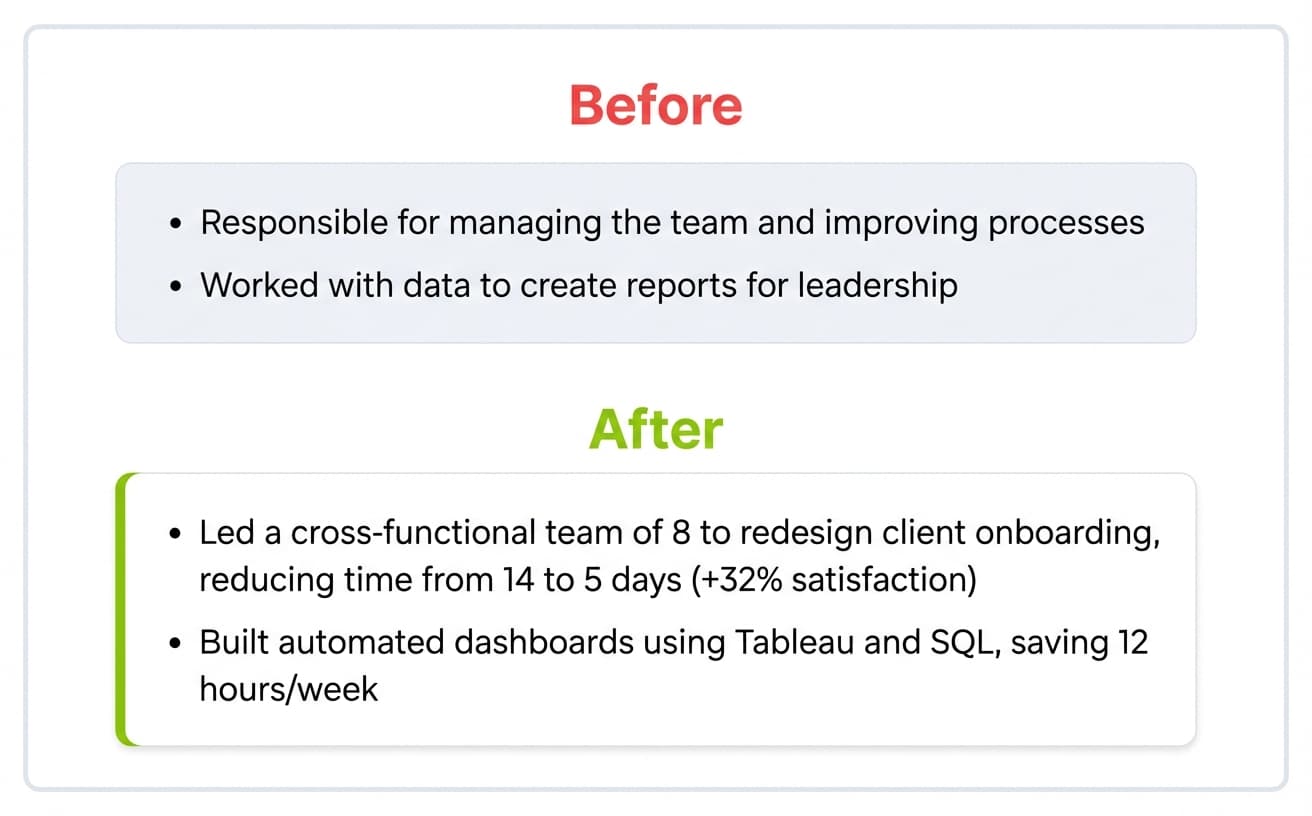
Before (vague, no keywords, no metrics): "Responsible for managing the team and improving processes"
After (STAR method, keywords from job post, measurable result): "Led a cross-functional team of 8 to redesign the client onboarding process, reducing average onboarding time from 14 days to 5 days and improving client satisfaction scores by 32%"
Before (generic, missing hard skills): "Worked with data to create reports for leadership"
After (specific tools named, quantified impact): "Built automated weekly dashboards using Tableau and SQL, consolidating 6 manual reports into a single executive view that saved the analytics team 12 hours per week"
Notice how the "after" versions naturally include hard skills (Tableau, SQL, client onboarding) and soft skills (cross-functional leadership, process improvement) without feeling forced. For more examples of strong bullet points, see our guide on top work experience bullet points with examples.
Simple, well-laid-out bullet points help ATS process your information correctly. They also make your achievements stand out to human reviewers after your resume passes the first review. These formatting choices significantly improve your chances of getting through automated filters.
Step 4: Test Your Resume with an ATS Resume Checker
Run your resume through Careerkit's free ATS checker to confirm it parses cleanly, then use the resume score checker to see how well it matches a specific job before you apply.
You have created a polished resume, and now it is time to verify it actually works. Even with the right keywords and formatting, small issues like an invisible text box or a non-standard date format can tank your ranking. This section explains how ATS checkers evaluate your document and what to look for in the results.
How ATS resume checkers work
ATS resume checkers replicate how real applicant tracking systems process your resume through several steps:
Upload and job targeting: You start by uploading your resume (usually as a PDF or Word document) and the job description you want. This step is vital because your resume might score high for one role but low for another.
Content extraction and parsing: The system's algorithms extract text from your document and parse each section. They identify your name, contact details, work history, skills, and education.
Category-based scoring: The core process happens when the system matches your resume against the job description. It gives scores based on several weighted factors:
Keyword relevance
Job fit analysis
Achievements and measurable effect
Formatting and machine readability
Language effectiveness
Technical and domain fit
Results and feedback: You get a numerical score and specific suggestions to improve.
What to look for in a scan report
A complete ATS scan report has these important sections you should review:
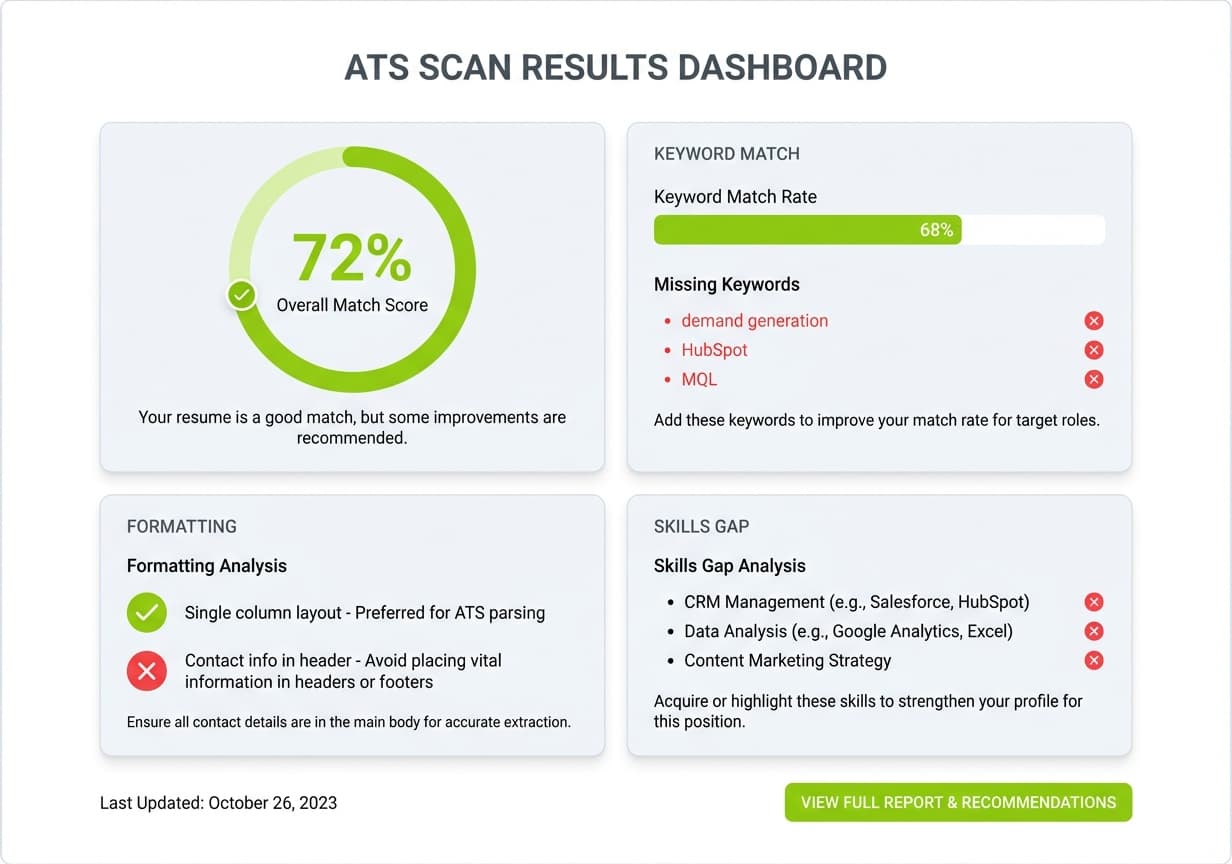
The reports show a keyword match percentage that reveals how many job-specific terms appear in your resume. Matches below 30% need immediate fixes.
Watch for formatting error alerts that show elements the parser can't read well. These include headers, tables, or graphics that disrupt the document flow.
Many tools give you a readability score (often using scales like Flesch-Kincaid) that shows how clear your content is. You should improve scores under 60.
The skills gap analysis is particularly useful. It spots specific competencies listed in the job posting that your resume doesn't mention. Fixing these gaps often leads to better scores.
How to test your resume for free
The simplest ATS compatibility test you can run right now takes 30 seconds and requires no tools at all. Save your resume as a plain text file (.txt) and open it. If your name, contact information, job titles, dates, and key skills all appear in the correct order with no scrambled text, your formatting is ATS-safe. If sections are missing or jumbled, your layout has elements that parsers cannot read.
For a more thorough check, use a purpose-built resume builder that bakes ATS optimization into the template from the start. Careerkit's resume builder generates resumes using ATS-tested templates with proper heading hierarchy, standard section labels, and clean single-column layouts, so you never have to retroactively fix parsing issues. The AI tailoring feature also matches your content to specific job descriptions, highlighting keyword gaps before you submit.
Whichever method you use, make testing an ongoing habit. Run your resume through a check before each application, since different roles prioritize different keywords and qualifications. For a broader look at resume optimization tools, see our roundup of the best resume builders in 2026. For a role-by-role walkthrough, see our guides on writing a Software Engineer resume, Data Analyst resume, or Python Developer resume.
Step 5: Avoid Common ATS Mistakes
Many qualified candidates get their applications deprioritized because of basic, avoidable errors. Formatting problems like tables, graphics, and non-standard layouts are among the most common reasons resumes parse incorrectly, according to recruiting experts surveyed by Enhancv. The fixes below take minutes but can dramatically improve your ranking. You can boost your chances of getting an interview by knowing these common mistakes.
Keyword stuffing and over-optimization
Smart keyword usage differs greatly from keyword stuffing. Recruiters can easily spot resumes that pack keywords without any real context. The latest ATS systems use advanced Natural Language Processing to catch unnatural keyword patterns.
Stuffing happens when you list keywords with no surrounding context, hide text by making it white (a tactic that modern ATS and recruiters both catch easily), or repeat the same terms unnaturally throughout the document.
Recruiters have become adept at spotting over-optimized resumes, and modern ATS platforms use Natural Language Processing that detects unnatural keyword patterns. An unnaturally high match score can actually hurt you if the content reads as robotic or copied from the job description. This approach hurts your credibility with recruiters and makes it look like you're gaming the system instead of showing your real qualifications.
Inconsistent formatting and date styles
Your work history can get mixed up when ATS systems encounter date formatting errors. Stick to one ATS-friendly option and use it consistently. Either use the MM/YYYY format (for example, 05/2026, always including leading zeros) or spell out the month followed by the year (for example, November 2022). Pick one and use it for every date on your resume.
We learned that most applicant tracking systems can't read tables, so any details inside them just disappear from your application. You should avoid creating tables, using text boxes, or adding graphics to your resume.
Using non-readable file formats
Your resume's file format determines whether it gets processed correctly. PDF works best as it keeps formatting consistent across devices and operating systems. But older ATS systems might have trouble with PDFs.
The job posting should be your guide for specific file format requirements. If nothing is specified, Microsoft Word's resume format (.doc) remains your safest bet. You can run a simple compatibility test by saving your resume as plain text (.txt). If information vanishes or jumbles up, you need to fix your formatting.
Putting It All Together
Making an ATS-friendly resume is a vital requirement, not just a helpful suggestion in today's competitive job market. This piece explores the steps you need to craft a resume that sails through automated screening systems and impresses human recruiters.
Modern ATS systems form the foundations of resume optimization. These sophisticated tools now power almost every hiring process. Large organizations depend heavily on them, with 97% of Fortune 500 companies using them to filter candidates.
Your visibility increases dramatically when you match job titles exactly and strategically incorporate both hard and soft skills from the job description. It also helps to use both acronyms and full terms to ensure maximum keyword recognition whatever way recruiters search their databases.
Your resume's format matters just as much as its content. Chronological or hybrid formats work best, while fancy designs with columns, tables, or graphics will definitely lead to rejection. Standard fonts, clear section headings, and proper spacing make your document both machine-readable and human-friendly.
Most candidates miss the importance of section organization. Clear titles like Work Experience instead of creative alternatives help ATS systems categorize information correctly. Regular text for contact details works better than headers to prevent critical information from disappearing during processing.
Testing your resume before submission is one of the best investments in your job search. Free ATS checkers spot potential issues, highlight missing keywords, and show formatting problems before your application reaches the employer's system.
The fine line between strategic optimization and manipulation needs careful attention. You should avoid common pitfalls such as keyword stuffing, inconsistent date formats, and non-readable file types to prevent needless rejections.
These five steps can reshape your job search results. Your carefully crafted resume will no longer vanish into the digital void but reach actual hiring managers. If you are writing your first resume ever, our step-by-step first resume guide walks through the process from scratch. If you are switching careers, our career change resume template shows how to reframe your experience for a new industry. If you are writing your first resume ever, our step-by-step first resume guide walks through the process from scratch. If you are switching careers, our career change resume template shows how to reframe your experience for a new industry. Note that because so many qualified candidates get ranked low by ATS software on formatting and keyword issues alone, the edge from proper ATS optimization might just be the difference between continued job searching and landing your dream position.
No. A 2025 study by Enhancv published on HR.com found that 92% of recruiters say their ATS does not auto-reject resumes based on formatting or content. What actually happens is that poorly optimized resumes get ranked so low that human reviewers never scroll down far enough to see them.
A standard .docx (Microsoft Word) file is the safest choice across all ATS platforms. Some systems also handle text-based PDFs well, but older platforms may struggle with them. Always check the job posting for specific format requirements before submitting.
There is no magic number. Focus on naturally incorporating the top 8 to 12 hard skills and 3 to 5 soft skills that appear most frequently in the job posting. Forcing in every keyword leads to stuffing, which modern ATS platforms flag as unnatural.
One column is the safest choice. ATS parsers read documents from top to bottom, left to right. Two-column layouts can cause the system to scramble content from adjacent columns into a single unreadable string. If you want a polished look without risking parsing errors, Careerkit's resume templates use single-column designs with visual hierarchy that looks professional and parses cleanly.
You can, but only for the version you hand to someone directly. For any online application that passes through an ATS, always submit a clean, single-column version. Many creative professionals maintain two versions of their resume for this reason.
Tailor your resume for every application. Each job posting uses different keywords, and a resume optimized for one role may score poorly for another. At minimum, update your skills section and top three bullet points to reflect the specific language in each job description.
Put this advice to work
You just read the theory. Careerkit's AI builder turns it into an ATS-ready resume, tailored to the job you want.
Nishant Modi is the founder of Careerkit.me and a product builder based in Zürich, Switzerland. With a background in product management, marketing & management consulting, he transitioned into AI entrepreneurship after experiencing the frustration of outdated job search tools firsthand. He built Careerkit to give every job seeker access to professional grade resume tools, the platform has helped over 10,000 candidates create ATS optimized resumes. He writes about resume strategy, hiring trends, and what actually gets people hired.