Home/Blog/Guide/How to Make Your Resume Stand Out in 2026
Guide
How to Make Your Resume Stand Out in 2026
Make your resume stand out in 2026 with ATS-friendly formatting, quantified achievements, and targeted keywords that clear automated filters and hold a recruiter's attention.
Watch: how to survive the 7-second resume skim (eye-tracking data + 3 moves)
5 resume tips that actually get you interviews
That means knowing how to make your resume stand out is not optional in today's job market. You need a resume that performs for both automated screening systems and human recruiters. This guide covers everything from formatting strategy to ATS optimization, with concrete examples and actionable techniques to help you land more interviews.
What Makes a Resume Stand Out
Before you start rewriting bullet points or tweaking fonts, it helps to understand what hiring professionals actually evaluate when they pick up your resume for the first time.
Understanding What Recruiters Look For
Recruiters assess your current role and title first when scanning your resume. They use this to gauge your seniority, functional expertise, and fit for the open position. Beyond titles, they look for logical career progression. Promotions, expanding responsibilities, and growing team sizes all signal strong performance and reliability.
Next, recruiters verify that you meet required skills and qualifications. They work from a checklist of must-have competencies and scan to confirm these boxes are checked before investing more time. Then they assess your impact in previous roles. Resumes that demonstrate quantifiable results, like revenue improvements or cost reductions, separate strong candidates from the rest, according to IQ Partners.
Red flags matter just as much. Unexplained employment gaps, patterns of short job tenures, inconsistent dates, or sloppy formatting can trigger concerns. Typos and messy organization suggest a lack of professionalism, and recruiters notice these details quickly.
Core Elements of Resumes That Stand Out
Several elements separate exceptional resumes from average ones. First, quantifiable achievements matter more than anything else. Instead of listing responsibilities, include specific metrics like percentages, dollar amounts, and measurable outcomes.
Weak: "Responsible for managing social media accounts"
Strong: "Grew Instagram following from 2,000 to 45,000 in 8 months, generating $120K in attributed revenue"
Tailored content is the second essential element. Customizing your resume for each application and incorporating relevant keywords from the job description signals to both ATS and recruiters that you are a serious candidate. Clean formatting with professional fonts like Calibri or Garamond in 10-12 point size, consistent spacing, and clear section headers makes your qualifications scannable within seconds. A strong summary statement of two to three concise sentences highlighting your relevant experience and value proposition anchors everything. Finally, listing only skills applicable to the target position, rather than padding with generic buzzwords, keeps your resume focused and credible.
Generic resumes that lack customization get overlooked fast. Your accomplishments appear passive when you skip action verbs and quantitative results. Grammatical errors and inconsistent formatting convey carelessness. Including irrelevant work experience wastes valuable space. Listing only job duties instead of achievements fails to demonstrate your impact.
Photos and fancy graphics can distract readers and may interfere with ATS scanning. And overusing cliches like "hardworking" or "team player" without concrete evidence dilutes your message, according to the University of Illinois Chicago Career Services.
Weak: "Hard-working team player with excellent communication skills"
Strong: "Cross-functional project lead who coordinated 4 departments to deliver a $2M product launch 3 weeks ahead of schedule"
How to Format Your Resume for Maximum Impact
Formatting determines whether your resume gets read or discarded. The right structure makes your qualifications scannable within seconds and keeps ATS software from misreading your content.
Choose the Right Resume Layout
The chronological resume remains the most widely used format and organizes work and education in reverse chronological order, according to Coursera's ATS guide. Use this layout when you are staying in the same field, show continuous career progress, or want to highlight impressive recent employers. Hiring managers prefer it because it demonstrates career progression and makes reviewing quick.
The functional resume rearranges employment history into skill-based sections with minimal emphasis on dates. Consider this format when you are changing careers, need to minimize employment gaps, or want to highlight transferable skills. However, recruiters often view functional resumes with skepticism because they obscure career advancement and when you developed certain skills. As noted by MIT's career development office, functional resumes can create uncertainty about how recent your qualifications are.
A combination format blends both approaches, starting with key skills followed by chronological work history. This works well for career changers or those with diverse experience, but it requires transparency about your work history rather than an attempt to hide gaps.
Set your font size between 10 and 12 points, according to the University of Illinois Chicago Career Services guide. Standard, easy-to-read fonts include Times New Roman, Helvetica, Garamond, Calibri, and Georgia. Sans-serif fonts like Arial and Calibri work well for digital submissions, while serif options like Cambria suit traditional fields, as recommended by Indeed's ATS resume guide.
Apply margins no smaller than 0.5 inches on all sides. Standard one-inch margins work best for shorter resumes, while margins of 0.75 or 0.5 inches accommodate more content. Use bold, italics, and bullets in moderation, and maintain consistency with spacing, indents, and date formatting throughout.
Not sure which font is right for your resume? Try our Resume Font Preview Tool to compare options side by side before committing.
Determine the Optimal Resume Length
Keep your resume to one page if you have one to ten years of experience. Two pages suit mid-career professionals with 10 to 15 years of relevant experience. Three pages generally apply only to those with over 25 years of continuous experience or to fields like academia and medicine. Limit each role description to three to seven bullet points, and keep bullet points to two lines maximum for easier scanning. In most cases, you should include only the last 15 years of experience.
Pick the Best File Type for Your Resume
PDF preserves your formatting across all devices and prevents accidental editing. Most modern applicant tracking systems can read PDFs, though some older systems struggle with them. Word documents (.doc or .docx) remain widely supported by ATS software, according to Indeed's ATS formatting guide. Use Word format when applying through large company portals, and PDF for direct recruiter submissions. Keep both versions ready for different submission scenarios, and always check the job posting for any specific file format requirements.
How to Make Your Resume Content Compelling
Content quality separates resumes that land interviews from those that get ignored. With recruiters spending just seconds on each resume, your content must demonstrate fit immediately.
Tailor Your Resume to Each Job Application
Ready to put this into a real resume?
Write it here for free. Paste the job posting and the editor shows you which of its terms your draft is missing.
Read the job description carefully and highlight keywords that appear multiple times or receive emphasis, as recommended in Goodwin University's resume checklist. Match your resume language to the posting and incorporate specific job titles and skill descriptors directly from the description.
Focus on your most relevant experiences rather than including everything. If you have unrelated roles, push relevant experience forward or create a "Relevant Experience" section. Save your document as "Full Name - Job Title - Resume" since some employers search their file systems based on file names.
Before tailoring: "Managed client relationships and oversaw project delivery"
After tailoring (for a "Client Success Manager" role): "Managed a portfolio of 35+ enterprise client accounts, achieving 97% retention rate and $1.2M in upsell revenue through proactive success planning"
Write a Strong Summary Statement
Your summary should contain two to three sentences highlighting your most valuable skills and experiences, according to Indeed's guide to resume summaries. Start with a key adjective describing yourself, then quantify your expertise.
Weak: "Experienced professional looking for new opportunities in customer service"
Strong: "Performance-driven customer success manager with 4+ years of experience achieving 98% client satisfaction ratings and managing $3M in annual recurring revenue"
Skip first-person references and filler words. Customize this section using keywords from the job posting for each application.
Highlight Achievements Over Responsibilities
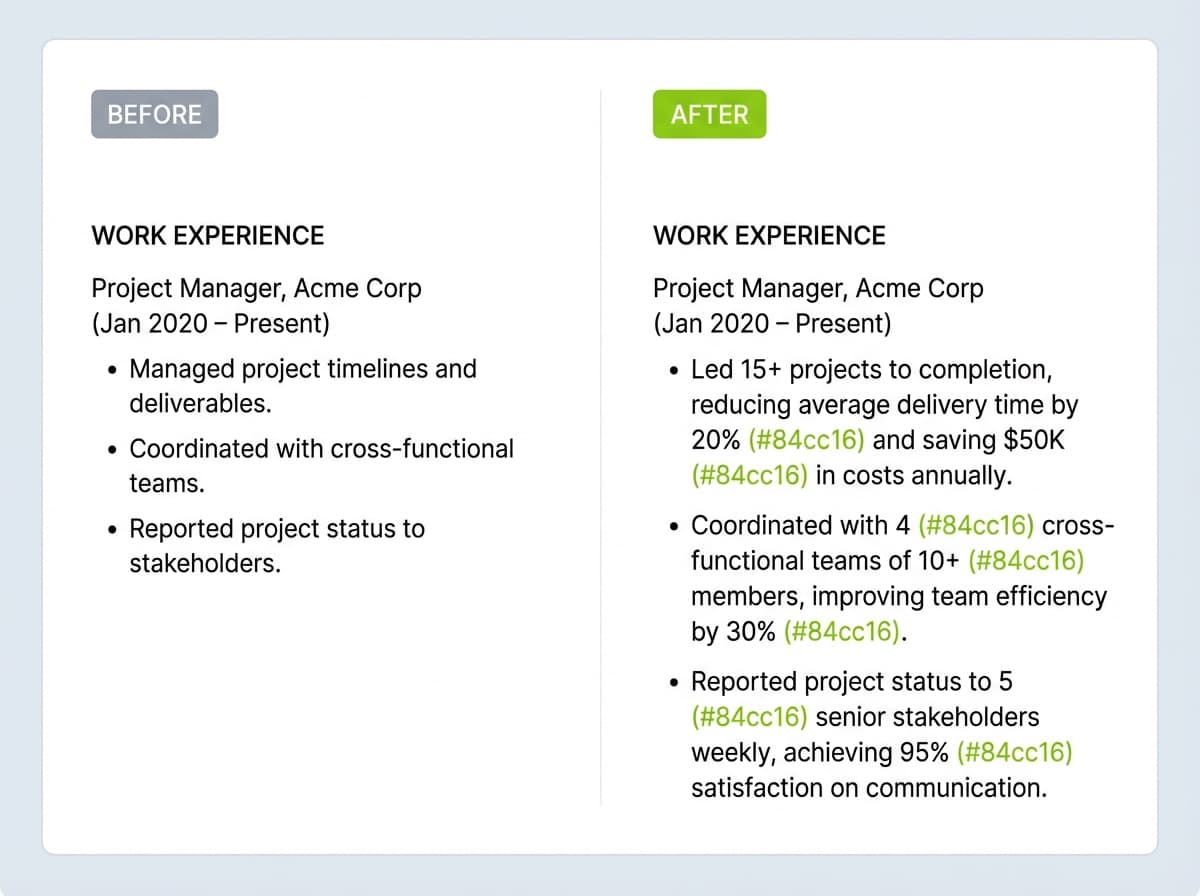
Transform task descriptions into accomplishment statements using the Action + Project + Result format, as recommended by Yale's Office of Career Strategy. Begin with action verbs like "spearheaded," "accelerated," or "generated" rather than weak verbs like "managed" or "responsible for." Focus on what you achieved, not what you were assigned to do.
Before: "Responsible for managing the onboarding process for new hires"
After: "Redesigned the onboarding process for 200+ annual hires, reducing time-to-productivity by 40% and increasing 90-day retention from 78% to 94%"
Ready to put these techniques into action? CareerKit's free resume builder helps you structure achievement-focused bullet points with the right keywords for your target role.
A reliable way to frame each accomplishment is the STAR method: briefly capture the Situation and Task, then lead with the Action you took and the measurable Result it produced. In practice you compress that into a single line, for example: "Cut onboarding time 30% by redesigning the training workflow for a team of 40." The result is what survives the recruiter's scan, so put it where the eye lands.
Include Relevant Skills and Keywords
List skills that match job requirements and place the most relevant ones first, as recommended by Indeed's guide to tailoring your resume. Use exact keywords from the job description one to three times throughout your resume. Both hard skills and soft skills matter, but technical abilities specific to the role take priority, according to Indeed's best resume skills guide.
Need help identifying the right skills for your target role? Our Resume Skills Generator analyzes job descriptions and suggests relevant skills to include.
Add Quantifiable Results and Metrics
Include specific numbers demonstrating your impact: revenue generated, costs reduced, time saved, or efficiency improved, as recommended by Indeed's guide to quantifying your resume. Measure scope by mentioning team sizes, budgets, or project scale. Use percentages to show improvement and context to make those percentages meaningful.
Vague: "Improved sales performance"
Quantified: "Increased quarterly sales from $340K to $510K (50% year-over-year growth) by implementing a consultative selling framework across a 12-person team"
Numbers make claims credible and help your resume stick in recruiters' minds. A quantified result turns a vague duty into evidence a hiring manager can trust in a seven-second scan, so attach a concrete metric to every bullet you can, whether it is a percentage, a dollar figure, a time saved, or a count of people or items.
How to Optimize Your Resume for Applicant Tracking Systems
More than 90% of employers now use a recruiting system to make a first cut or rank applicants, according to Harvard Business School's Hidden Workers report. These automated tools handle the initial sorting and process dozens or thousands of applications quickly, so understanding how they work is critical to getting your resume in front of a human.
Understanding ATS and Why It Matters
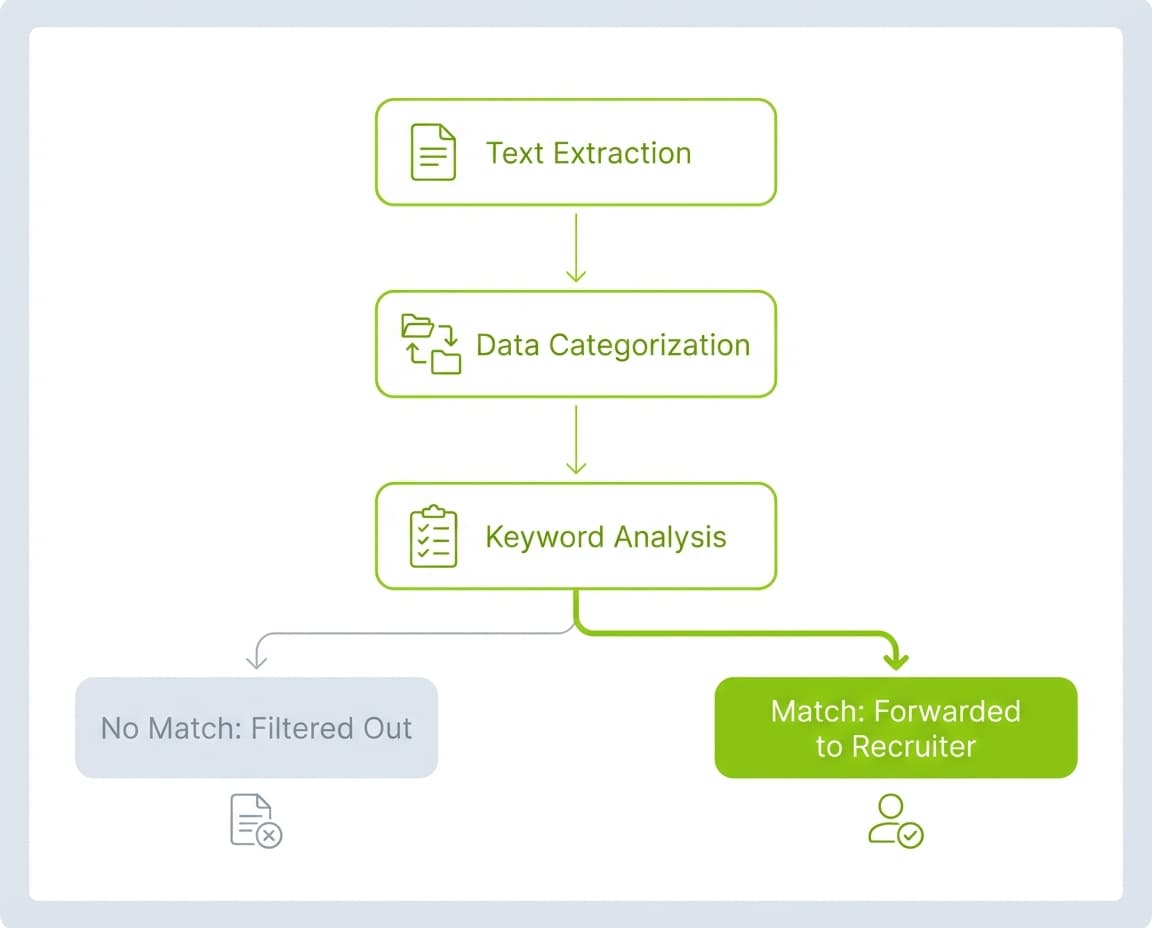
Applicant tracking systems automate recruitment by scanning resumes for businesses of all sizes. When you submit an application online, the ATS extracts details like skills, job titles, and certifications. The system processes your resume in three stages: text extraction (pulling plain text while stripping away formatting), data categorization (sorting information into sections like work history and education), and keyword analysis (comparing your content against job requirements).
A Harvard Business School and Accenture study called "Hidden Workers: Untapped Talent" found that 88% of employers acknowledge their automated screening filters out qualified candidates who don't match exact job criteria. This means even strong candidates get passed over if their resumes aren't formatted and written for ATS compatibility. More advanced systems evaluate context rather than just keyword presence.
Weak ATS match: Listing "management" under skills
Strong ATS match: "Managed a team of 10 software engineers, delivering 3 product releases on schedule and 15% under budget"
Use ATS-Friendly Formatting
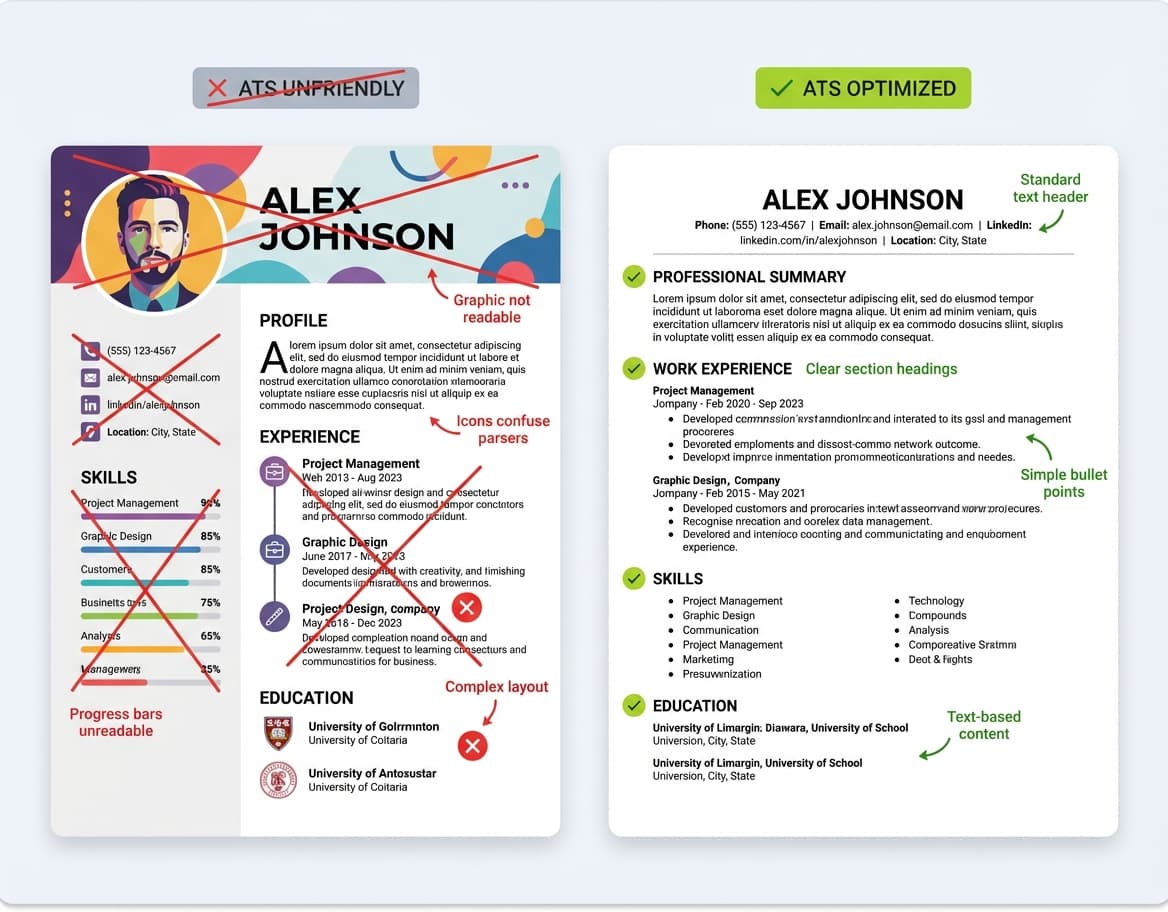
Stick to a single-column layout with standard section headings, as recommended by Indeed's ATS resume template guide. Use labels like "Professional Summary," "Work Experience," "Education," and "Skills" because ATS relies on these to locate your qualifications. Creative alternatives like "My Journey" or "What I Bring to the Table" confuse ATS systems, so avoid them.
Complex layouts, tables, graphics, and text boxes disrupt ATS scanning. Systems like Taleo or iCIMS may fail to process critical information if your contact details sit in a header or your resume uses multi-column design. These platforms convert resumes into plain text, which often scrambles content in non-standard formats. Your phone number could disappear, job titles might jumble, and your skills section could become unreadable.
Choose standard fonts like Arial, Calibri, or Times New Roman in 10-12 point size. These remain legible to both ATS software and humans. Save your resume as .docx for most online applications. While many modern systems accept PDFs, .docx files offer the safest compatibility. ATS systems cannot read images, so avoid .jpg, .png, or scanned PDF formats. Always verify the job posting for accepted file types before submitting.
Incorporate Job-Specific Keywords
Scan the job listing for repeated or highlighted terms like specific job titles or certifications. Study 10 to 20 target job descriptions to identify keyword patterns across your industry. Match these terms to your background and weave them into your resume content naturally.
Incorporate keywords throughout every section. Your professional summary should include keywords relating to job-relevant skills, achievements, and years of experience. Detail the tools, programs, and technical skills you used to achieve goals in your employment history. Create a skills section listing competencies from the job description.
Include both acronyms and full terms. Write "Master of Business Administration (MBA)" or "Certified Public Accountant (CPA)" to maximize reach, as recommended by the University of Illinois Chicago Career Services. If the posting mentions "Salesforce CRM," use the full term rather than just "CRM."
Use keywords in context by incorporating them into achievement-oriented bullet points rather than simply listing them. The Harvard Business School "Hidden Workers" study found that 88% of employers say their hiring systems filter out qualified candidates who don't precisely match the job description. But avoid keyword stuffing. Overloading your resume with keywords makes it harder for recruiters to understand your experience and can trigger spam filters in more advanced ATS platforms.
Avoid ATS Pitfalls
Tables, text boxes, headers, footers, and graphics confuse ATS software. These systems may skip critical information entirely when content sits in these elements. ATS cannot read images, icons, logos, or charts, so avoid including them.
Don't place credentials like MBA or CPA next to your name. Include that information on a separate line. Skip special characters or accented words. The word "resume" with accents ("resume") is not ATS-friendly because the system may not recognize accented letters and could misread the term. Maintain consistent date formats throughout your resume. Mixing formats like "March 2023," "03/2023," and "3-23" confuses ATS and distorts your job history. Use a single clear format like MM/YYYY and list dates to the right of employment information.
Never include skills you don't possess in an attempt to trick the system. Anything on your resume needs substantiation in an interview or skills-based test. Also avoid applying for too many roles at the same company, as recruiters can see your full application history in the ATS, according to Coursera's guide to applicant tracking systems.
Proofread and Quality Check Your Resume
A quick test for ATS compatibility involves pasting your resume into a plain-text editor like Notepad, as recommended by MIT's CAPD. If all sections appear intact and readable, your formatting is likely ATS-friendly. If content jumbles, shifts, or disappears, you have formatting issues to fix.
Check all contact information for accuracy, according to Goodwin University's resume checklist. Verify that your name, address, ZIP code, phone number, and email are correct. Use a professional personal email, not one from work. Read your resume aloud to catch awkward, missing, or extra words. Verify all years, numbers, facts, and figures for consistency.
Examine spacing to ensure consistent gaps between sentences and sections. Perform a spell check, then read it yourself, because most misspelled words occur in headings and company names. Review verb tenses carefully: duties you currently perform should use present tense, while past jobs require past tense, as noted by the Queensborough Community College Career Services checklist. Verify that date formats remain consistent throughout, and check that state abbreviations use two letters with no periods.
Wondering where to start? Build your resume with CareerKit and get a clean, ATS-optimized format from the beginning, so you can focus on writing compelling content instead of wrestling with formatting.
Conclusion
You now have everything you need to create a resume that captures attention and lands interviews. The difference between getting overlooked and getting hired comes down to strategic formatting, compelling content, and ATS optimization working together.
Start by picking the right format and layout for your career stage. Then rewrite every bullet point to focus on achievements and metrics, not responsibilities. Tailor your resume for each application using keywords from the job description. Run it through a plain-text test to catch ATS issues, and proofread until every detail is consistent and error-free.
Your resume represents your first impression with every employer. Make those seven seconds count by applying the techniques in this guide, and pair your resume with a strong cover letter to maximize your chances. When you are ready, explore more of our resume-building resources on CareerKit's blog to stay ahead of the competition.
The widely cited figure is 7.4 seconds, based on a Ladders eye-tracking study reported by HR Dive in 2018. However, more recent data from a 2024 ResumeGo survey of 418 hiring professionals found that 47% spend 30 seconds to one minute on the initial review. The real takeaway is that your resume must make a strong first impression quickly, regardless of the exact number.
Both formats work with most modern ATS platforms. Use .docx when applying through large company portals or when the job posting does not specify a format, as it offers the broadest compatibility. Use PDF when submitting directly to a recruiter or when you need to preserve exact formatting. Keep both versions ready and always check the job posting for instructions.
The simplest test is pasting your resume into a plain-text editor like Notepad. If all sections appear intact and readable with no jumbled text, missing content, or scrambled headings, your formatting is likely ATS-compatible. Look specifically for contact information, job titles, dates, and skills appearing correctly.
For most professionals with one to ten years of experience, one page is ideal. Two pages work for mid-career professionals with 10 to 15 years of relevant experience. Three pages are appropriate only for those with 25+ years of experience or in fields like academia, medicine, or federal government. Regardless of length, limit each role to three to seven concise bullet points.
Pull keywords directly from the job description, focusing on specific job titles, required skills, certifications, and tools mentioned multiple times. Include both full terms and acronyms (e.g., "Certified Public Accountant (CPA)"). Study 10 to 20 similar job postings to identify common keyword patterns in your target role and industry.
Yes. Multi-column layouts, text boxes, graphics, icons, progress bars, and custom fonts can all disrupt ATS parsing. When an ATS cannot read your formatting, it may miss or scramble critical information like your job titles, dates, or skills. Stick to a clean single-column layout with standard section headings for the best results.
Nishant Modi is the founder of Careerkit.me and a product builder based in Zürich, Switzerland. With a background in product management, marketing & management consulting, he transitioned into AI entrepreneurship after experiencing the frustration of outdated job search tools firsthand. He built Careerkit to give every job seeker access to professional grade resume tools, the platform has helped over 10,000 candidates create ATS optimized resumes. He writes about resume strategy, hiring trends, and what actually gets people hired.