Body text should stay between 10-12 points. Smaller text gets hard to read, and bigger text looks unprofessional. Don't squeeze in more content by shrinking your font - just make your writing more concise.
Creating visual hierarchy with headings
A good visual flow guides readers through your resume. Your section headings should:
- Be bold or 1-2 points bigger than body text
- Look the same throughout your resume
- Pop out without taking over the page
This layout helps recruiters find what they need during their quick review.
Avoiding clutter and dense blocks of text
Big chunks of text can scare readers away. Here's what to do instead:
- Use bullet points to show achievements (3-4 per job)
- Keep each bullet point to 1-2 lines
- Space your sections evenly
- Line up text to the left for better reading
A clean, simple layout shows you know how to communicate clearly - something employers really value.
Optimize for AI and ATS Systems
Getting past automated gatekeepers is a vital first step in today's hiring process. The numbers are striking - 99% of Fortune 500 companies now employ Applicant Tracking Systems (ATS) to screen resumes.
Use standard section titles
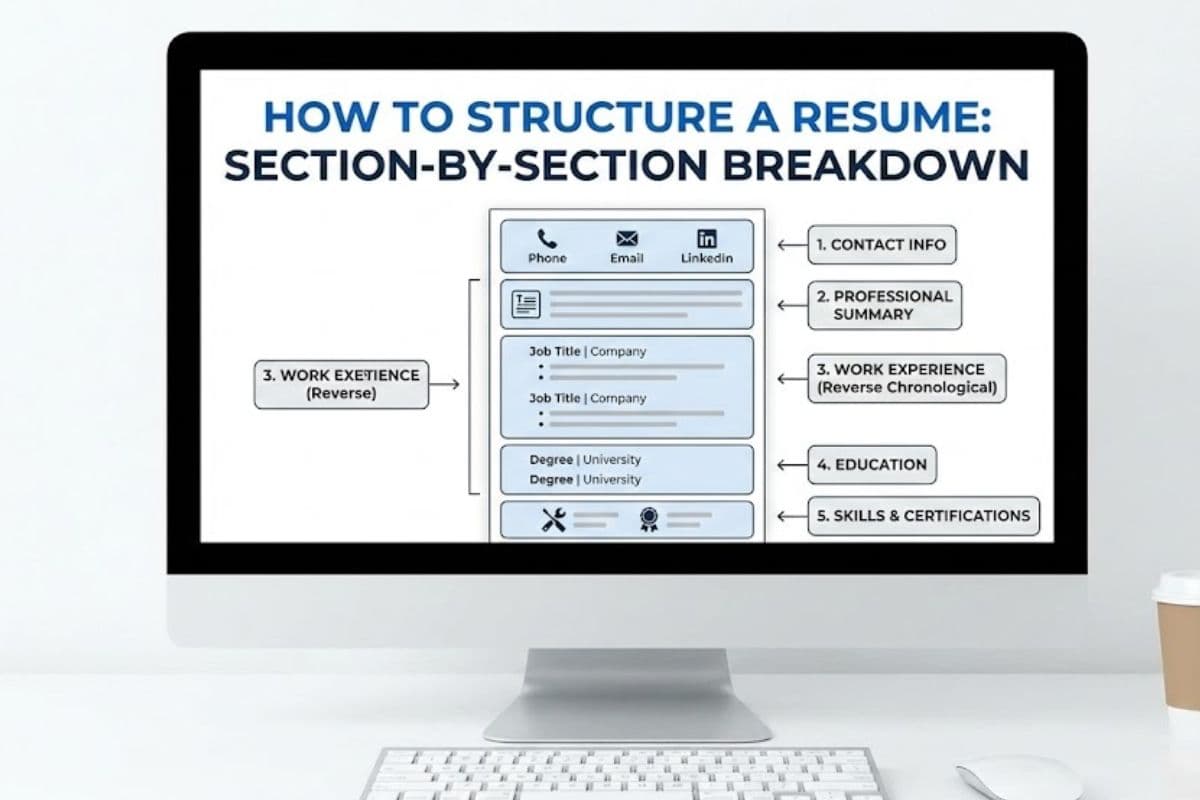
Your resume needs headers that ATS systems can easily spot. Simple labels like "Professional Summary," "Work Experience," "Education," and "Skills" help these systems properly sort your qualifications. Creative alternatives won't work since ATS software looks specifically for standard headers to find your details.
Avoid tables and graphics
Tables, text boxes, columns, and images look great but they confuse ATS software. The system might distort, ignore, or completely erase these elements during processing. AI systems might see even the best-designed infographics as empty spaces.
Include relevant keywords naturally
The job posting deserves a careful review to spot role-specific terms and phrases. These keywords should flow naturally through your resume sections. When using acronyms, you should include both versions - CRM and Customer Relationship Management.
Use consistent date and location formats
Pick one date format and stick to it throughout your resume. Month Year (Jan 2022) works best. Your location information belongs in the main text, not in headers or footers.
Save in the right file format
Word (.docx) gives you the best chance with ATS systems. While some systems can handle text-based PDFs, you should always check what the application instructions say.
Make It Human-Friendly and Future-Proof
Your resume should impress human recruiters, not just AI systems. Here's how you can make it stand out while keeping it adaptable:
Use bullet points for achievements
Bullet points make dense text easier to scan. Strong action verbs like "created," "managed," and "led" should start each bullet point. Keep your bullets between 4-6 per role. Show your achievements and results rather than listing routine tasks.
Highlight key results with numbers
Numbers make your achievements more credible and memorable. Add specific metrics such as "increased sales by 37%" or "managed a team of 12". You can measure success even in non-quantitative roles through frequency ("reviewed 40-50 articles weekly") or scale ("presented to audiences of 60+").
Ensure mobile readability
A surprising 62% of hiring managers read resumes on their smartphones. Single columns, brief bullet points under 12 words, and plenty of white space make resumes mobile-friendly. Your resume should look great across different devices before submission.
Add accessibility features like alt text
Both disabled users and ATS systems benefit from screen reader-compatible resumes. Clear heading structures, descriptive hyperlinks, and alt text for images make your resume more accessible. Everyone reads better with high contrast between text and background (at least 4.5:1 ratio).
Create a modular resume for easy updates
A repository of pre-written bullet points sorted by skill categories saves time. This approach lets you customize quickly for different job applications without starting over.
Becoming skilled at resume formatting is a vital skill in today's competitive job market. This piece shows how proper formatting works for both AI screening systems and human recruiters. Your application needs to make an impact during those significant 6-8 seconds of review time.
A clean design matters more than creativity in resume layouts. Your qualifications will stand out with proper white space, readable fonts, and clear visual hierarchy. On top of that, it helps to optimize for ATS systems through standard section titles and strategic keywords. This approach will give your resume the best chance to pass those first digital gatekeepers.
A well-laid-out resume shows your professionalism and communication abilities. Bullet points that showcase measurable achievements and mobile-friendly layouts prove you understand what modern recruiters need. A modular resume approach lets you adapt quickly for different roles without starting over each time.
The digital world of resumes will without doubt keep changing with technology, but some principles stay constant. The main goal remains simple - to clearly show your value to potential employers. A strategically formatted resume increases your chances to advance in the hiring process, whether facing AI systems or human reviewers.
These formatting guidelines will help you create a resume that passes automated screening and catches recruiters' attention during their quick review. This significant document starts your professional experience - make those 6-8 seconds work in your favor.