10 Lebenslauffehler, die zur automatischen Ablehnung führen (und wie Sie sie beheben) | Careerkit
Startseite/Blog/Blog/10 Lebenslauffehler, die zur automatischen Ablehnung führen (und wie Sie sie beheben)
Blog
10 Lebenslauffehler, die zur automatischen Ablehnung führen (und wie Sie sie beheben)
Die 10 Lebenslauffehler, die Ihre Bewerbung begraben, bevor ein Mensch sie sieht, plus die genauen Korrekturen, auf die Recruiter und ATS wirklich achten.
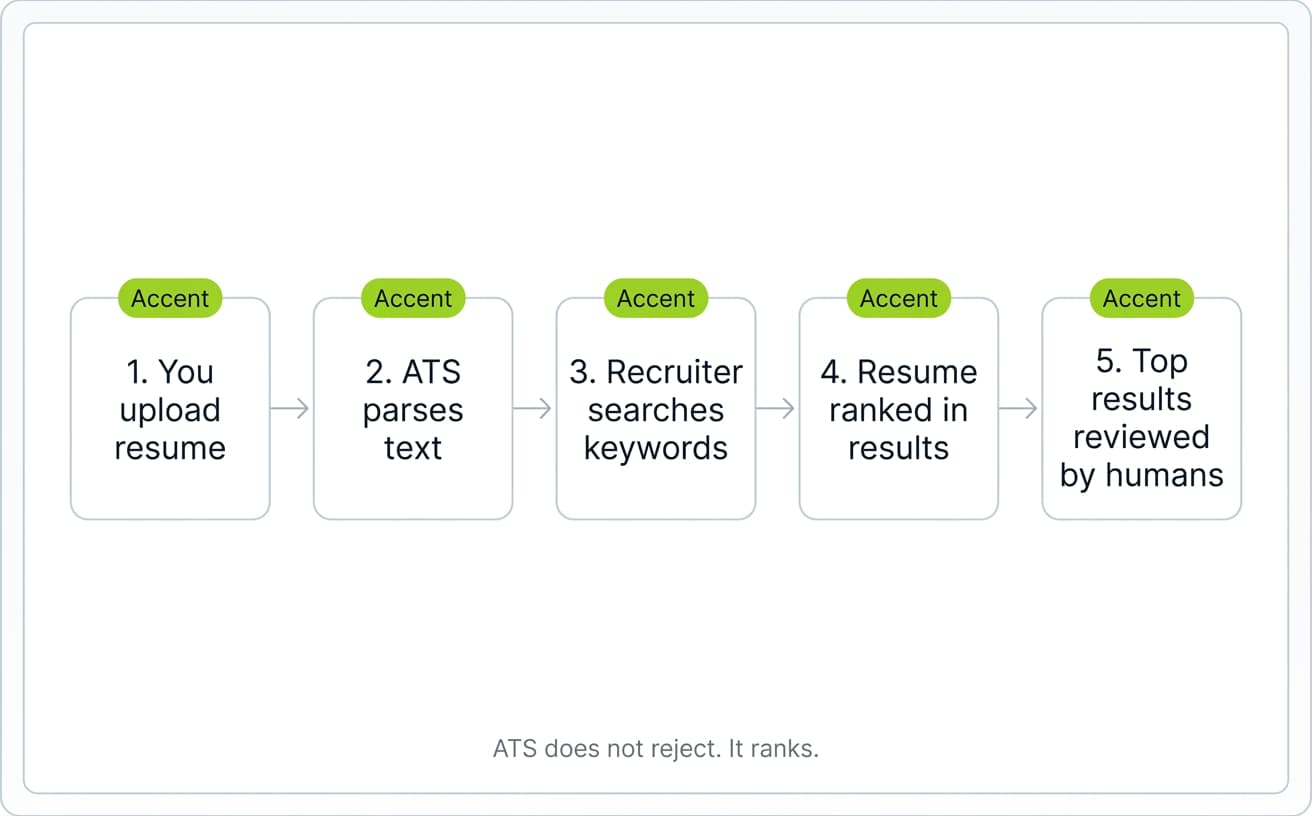
Ihr Lebenslauf wird wahrscheinlich nicht so „abgelehnt", wie Sie denken. Kein Roboter stempelt ihn mit einem roten ABGELEHNT. Was tatsächlich passiert, ist stiller: Ein Personalverantwortlicher sucht in seinem Applicant Tracking System nach „Senior Marketing Manager Boston", und Ihr Lebenslauf taucht nicht unter den Top-50-Ergebnissen auf. Sie hören nie wieder etwas. Die Bewerbung sieht abgelehnt aus, wurde technisch aber nur begraben.
Watch: how to write a resume, section by section (with the data)
Watch: why references don't belong on your resume (and what to do instead)
5 resume tips that actually get you interviews
Eine Enhancv-Studie von 2025 mit 25 US-Recruitern aus den Bereichen Tech, Gesundheitswesen, Finanzen und Fertigung ergab, dass 92 % der ATS-Plattformen Lebensläufe nicht automatisch wegen Format- oder Designproblemen ablehnen. Sie ordnen, ranken und stellen Kandidaten heraus. Über die Ablehnung entscheiden Menschen. Die Gefahr für Bewerber ist nicht ein Roboter, der Nein sagt. Es ist ein Personalverantwortlicher, der nach bestimmten Schlüsselwörtern sucht, und Ihr Lebenslauf erscheint nicht.
Deshalb schaden kleine Fehler so sehr. Laut einer von HR Dive zitierten Eye-Tracking-Studie von Ladders aus dem Jahr 2018 verbringen Personalverantwortliche im Schnitt 7,4 Sekunden mit dem ersten Überfliegen eines Lebenslaufs. Wenn ein Personalverantwortlicher Ihre Position, Ihre Datumsangaben und ein oder zwei relevante Erfolge in diesem Zeitfenster nicht findet, sind Sie draussen. Und wenn Ihr Lebenslauf einen Tippfehler enthält, , so eine CareerBuilder-Umfrage.
Dieser Artikel geht die 10 häufigsten Lebenslauffehler durch, die zu dieser Art stiller Ablehnung führen, mit der Lösung für jeden einzelnen. Das Ziel ist nicht, einen Algorithmus auszutricksen. Es geht darum, Ihren Lebenslauf sowohl für die Software, die ihn ordnet, als auch für den Menschen, der entscheidet, lesbar zu machen.
Wie ATS-Software Ihren Lebenslauf tatsächlich verarbeitet
Bevor ein Personalverantwortlicher Ihre Bewerbung sieht, hat die Software sie bereits ausgelesen, indexiert und entschieden, wo sie in den Suchergebnissen eines Recruiters steht. Zu verstehen, was diese Software tut (und was nicht), macht den Unterschied zwischen einem Lebenslauf für einen echten Leser und einem Lebenslauf für einen Mythos aus. Um zu erfahren, wie jeder Abschnitt Ihres Lebenslaufs sowohl von der Software als auch vom Recruiter gelesen wird, schlüsselt unser Leitfaden zum Aufbau eines Lebenslaufs alles Abschnitt für Abschnitt auf.
Was ein ATS ist und was es tatsächlich tut
Ein Applicant Tracking System (ATS) ist die Datenbank, mit der Personalverantwortliche Bewerbungen sammeln, ordnen und durchsuchen. Laut Select Software Reviews setzen rund 98 % der Fortune-500-Unternehmen eines ein. Workday, Greenhouse, iCIMS, Lever und SuccessFactors sind die Plattformen, denen Sie am ehesten begegnen.
Wenn Sie einen Lebenslauf einreichen, liest das ATS ihn in strukturierte Felder aus: Name, Kontaktdaten, Berufsverlauf, Ausbildung, Kenntnisse. Format, Bilder und alles, was es nicht als reinen Text lesen kann, entfernt es. Der Personalverantwortliche durchsucht diese Datenbank dann so, wie Sie Google durchsuchen würden. Er tippt „5 Jahre SaaS-Vertrieb Boston" ein, und das ATS liefert gerankte Ergebnisse.
Die wenigen Fälle, in denen ein ATS tatsächlich automatisch ablehnt, hängen mit „Ausschlussfragen" zusammen, die Sie vor dem Absenden beantworten: etwa Arbeitserlaubnis, erforderliche Zertifizierungen oder Mindestjahre an Erfahrung. Diese Ablehnungen beruhen auf Regeln, die der Recruiter festgelegt hat, nicht auf einem Urteil der Software über Ihren Lebenslaufinhalt.
Das 7,4-Sekunden-Überfliegen
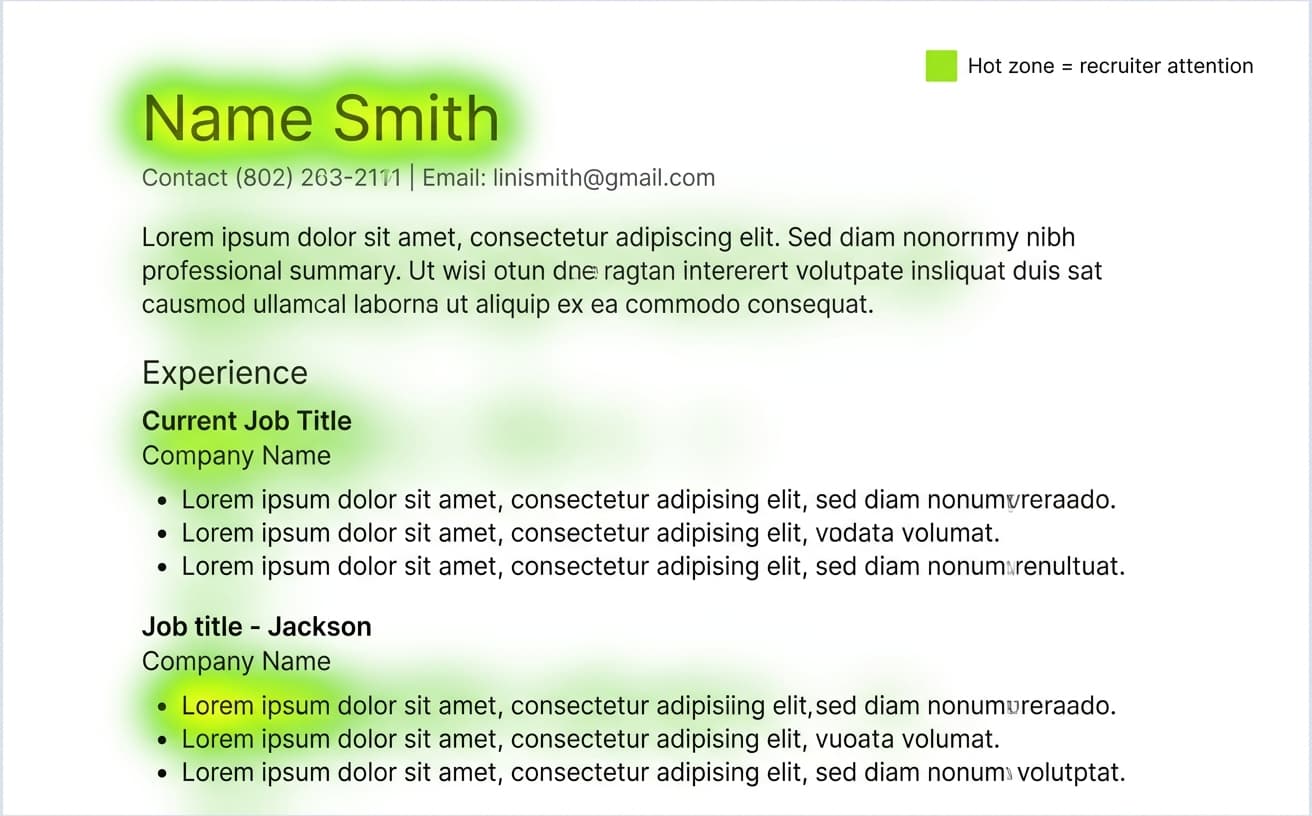
Sobald Ihr Lebenslauf in den Suchergebnissen eines Recruiters auftaucht, haben Sie etwa 7,4 Sekunden, um seine Aufmerksamkeit zu halten, laut der von HR Dive berichteten Eye-Tracking-Studie von Ladders aus dem Jahr 2018. Das ist mehr als die 6 Sekunden ihrer Studie von 2012, aber immer noch kaum genug Zeit, um einen Absatz zu lesen.
Eye-Tracking-Heatmaps aus der Studie zeigten, dass Personalverantwortliche Lebensläufe in einem F-Muster überfliegen: quer über den oberen Rand, hinunter am linken Rand, wobei die meiste Aufmerksamkeit auf Ihrem Namen, Ihrer aktuellen Position, Ihrem aktuellen Arbeitgeber und dem ersten Stichpunkt unter Ihrer jüngsten Rolle liegt. Alles, was nicht sauber in dieses Muster passt (lange Absätze, dichter Text, mehrspaltige Layouts), wird meist übersprungen.
Warum das Format entscheidet, ob Sie korrekt ausgelesen werden
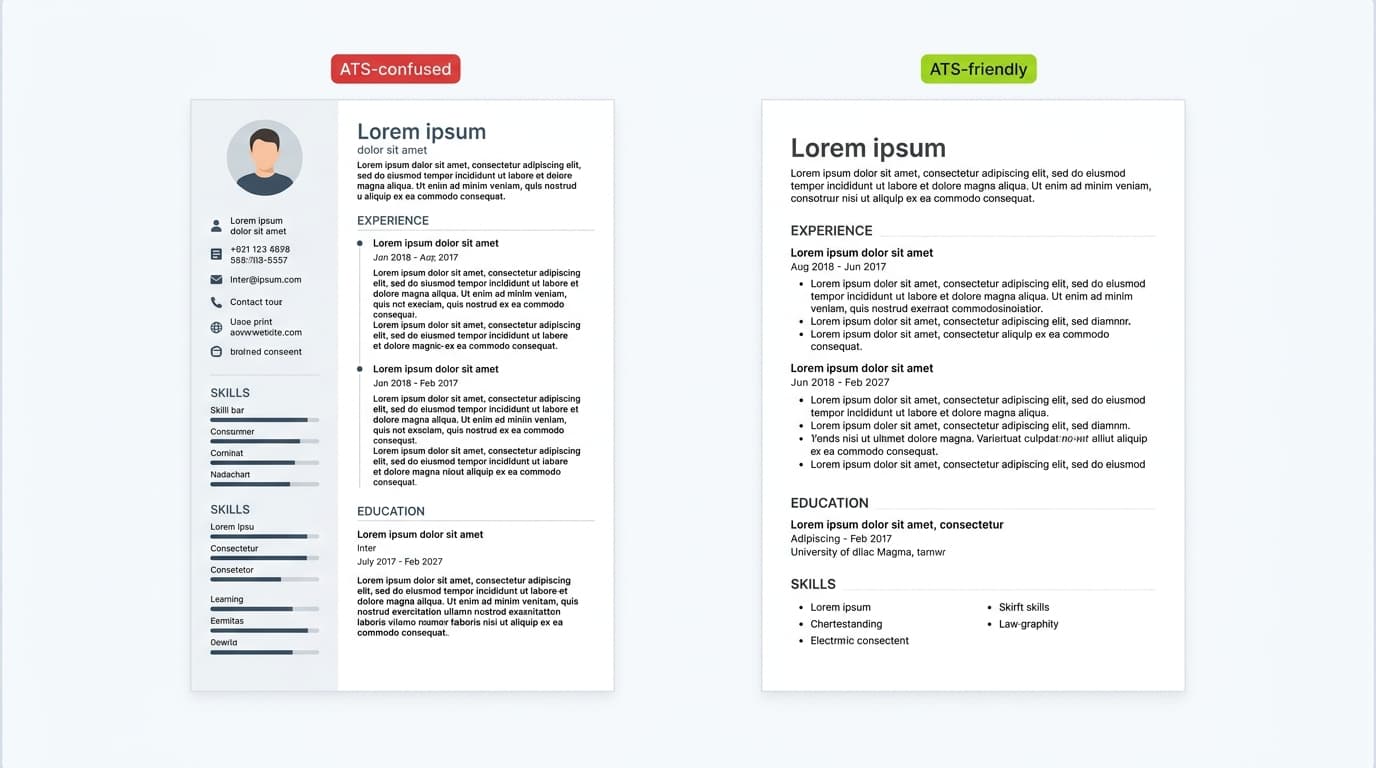
Beim Format geht es nicht darum, hübsch auszusehen. Es geht darum, ob das ATS Ihre Informationen beim Auslesen Ihrer Datei korrekt extrahieren kann. Ein zweispaltiges Layout mit Symbolen und einer eigenen Schriftart mag in Canva grossartig aussehen, doch der Parser liest es oft als durcheinandergewürfelten Text, mit fehlenden Stellenbezeichnungen oder leeren Erfahrungsfeldern.
Die wichtigsten Formatentscheidungen sind einfach. Reichen Sie standardmässig eine .docx-Datei ein oder ein textbasiertes PDF, wenn die Bewerbung es erlaubt. Verwenden Sie ein einspaltiges Layout. Setzen Sie den Fliesstext in eine Standardschriftart wie Arial, Calibri, Inter oder Times New Roman in 10 bis 12 Punkt. Beschriften Sie Ihre Abschnitte mit konventionellen Überschriften (Berufserfahrung, Ausbildung, Kenntnisse, nicht „Mein Weg" oder „Was ich mitbringe"). Und formatieren Sie jedes Datum als Monat und Jahr. Wenn Sie nicht sicher sind, wie Ihre Schriftwahl nach dem Auslesen wirkt, können Sie mit dem Schriftvorschau-Tool für Lebensläufe verschiedene Optionen an einer klaren, ATS-freundlichen Vorlage testen.
Ein Detail überrascht viele Bewerber: Viele ATS-Parser können Inhalte in Kopf- oder Fusszeilen von Word-Dokumenten nicht lesen. Stehen Ihr Name, Ihre E-Mail und Ihre Telefonnummer in der Kopfzeile, extrahiert das ATS womöglich einen Lebenslauf ganz ohne Kontaktdaten. Setzen Sie Kontaktdaten immer in den Hauptteil des Dokuments.
10 Lebenslauffehler, die Ihre Bewerbung heimlich begraben
Die meisten Lebenslaufablehnungen sind nicht dramatisch. Ihr Lebenslauf taucht einfach nicht in der Suche des Recruiters auf, oder er bekommt einen 7-Sekunden-Blick und landet auf dem „Nein"-Stapel. Nachfolgend die 10 häufigsten Fehler, die das verursachen. Jeder lässt sich in unter 10 Minuten beheben, und die meisten Bewerber haben gerade jetzt mindestens drei davon in ihrem Lebenslauf.
1. Tabellen, Spalten oder Grafiken verwenden
Gestaltete Lebensläufe aus Canva, Figma oder Photoshop wirken poliert, doch sie bringen ATS-Parser oft aus dem Tritt. Mehrspaltige Layouts werden in der falschen Reihenfolge gelesen. Tabellen werden zu Textwänden. Symbole neben den Kontaktdaten verschwinden oder erscheinen als verstümmelte Zeichen.
Bleiben Sie bei einem einspaltigen Layout, einfachen runden oder Bindestrich-Stichpunkten und null Textfeldern. Die meisten Parser verarbeiten eine saubere .docx-Datei fehlerfrei. Dieselben Parser scheitern an einem schön gestalteten PDF.
2. Im falschen Dateiformat speichern
Das Bewerbungsformular sagt Ihnen meist, was Sie einreichen sollen. Lesen Sie es. Steht dort .docx, laden Sie kein PDF hoch. Steht dort PDF, achten Sie darauf, dass es textbasiert ist und kein gescanntes Bild eines Lebenslaufs (das die meisten Parser gar nicht lesen können). Ist das Format nicht angegeben, ist .docx die sicherste Wahl, denn jedes grosse ATS liest es problemlos.
Vermeiden Sie .pages, .odt, .rtf und als PDF gespeicherte Screenshots. Das sind die Dateitypen, die beim Auslesen still versagen.
[KEEP THE EXISTING CTA BLOCK HERE - "Bereit fuer Ihren Traumjob?"]
Ein falscher Dateityp senkt nicht nur Ihre Übereinstimmungspunktzahl. Er führt oft zu einem Lebenslauf, den das ATS gar nicht lesen kann, sodass der Recruiter ein leeres oder fast leeres Profil sieht.
3. Die Schlüsselwörter aus der Stellenausschreibung übersehen
Personalverantwortliche durchsuchen das ATS mit Begriffen, die direkt aus der Stellenausschreibung stammen. Fehlen diese Begriffe in Ihrem Lebenslauf, erscheinen Sie nicht in den Ergebnissen. Das ist der mit Abstand häufigste Grund, warum qualifizierte Bewerber begraben werden.
Ziehen Sie die 8 bis 12 am häufigsten genannten Fähigkeiten, Tools und Qualifikationen aus der Stellenausschreibung heraus und sorgen Sie dafür, dass sie natürlich in Ihrem Profil, Ihrem Kompetenzbereich und Ihren Erfahrungs-Stichpunkten vorkommen. Schreiben Sie Abkürzungen bei der ersten Verwendung aus, etwa „Search Engine Optimization (SEO)", weil manche Parser eigenständige Abkürzungen nicht erkennen. Wenn Sie eine Ausgangsliste relevanter Fähigkeiten für Ihre Rolle brauchen, liefert Ihnen der Resume Skills Generator rollenspezifische Vorschläge, die aus echten Stellenausschreibungen stammen.
4. Kreative oder unübliche Stellenbezeichnungen verwenden
Wenn Ihre tatsächliche Bezeichnung im letzten Job „Chief Happiness Officer" oder „Marketing Ninja" war, ist das nicht das, wonach Personalverantwortliche suchen. Sie suchen nach „HR Manager" oder „Marketing Manager". Eine kreative Bezeichnung führt dazu, dass Ihr Lebenslauf nie auftaucht.
Die Lösung ist einfach: Nennen Sie Ihre offizielle Bezeichnung zusammen mit dem branchenüblichen Äquivalent in Klammern. Zum Beispiel: „Marketing Ninja (Senior Marketing Manager)". So bleiben Sie ehrlich, wie Ihr Unternehmen Sie genannt hat, und stellen zugleich sicher, dass die suchfreundliche Version auf der Seite steht. Weitere Beispiele, wie Sie Ihren Berufsverlauf für Software- und menschliche Leser formulieren, finden Sie in unserem Leitfaden zu Stichpunkten zur Berufserfahrung, die auffallen.
5. Datumsangaben weglassen oder uneinheitliche Formate verwenden
Personalverantwortliche und ATS-Suchfilter erwarten bei jeder Stelle das Format Monat und Jahr. Uneinheitliche Datumsangaben erschweren beiden, Ihren beruflichen Werdegang auf einen Blick zu verfolgen, und ein funktionaler Lebenslauf ganz ohne Datumsangaben wirkt wie ein Warnsignal für verborgene Lücken.
Bereit fuer Ihren Traumjob?
Schliessen Sie sich 50.000+ Jobsuchenden an, die ihre Karriere bereits mit unserem KI-gestuetzten Lebenslauf-Builder verwandelt haben.



![Cover Letter vs Resume: What Hiring Managers Actually Read First [2026]](/_next/image?url=%2Fapi%2Fmedia%2Ffile%2Fcoverletterandresume.png&w=1920&q=75)