Créateur de CV ATS gratuit: le top 5 testé pour 2026
Meilleur créateur de CV ATS gratuit 2026: 5 outils testés (Careerkit, Canva, Indeed) avec avantages, limites et ce qui aide vraiment votre CV à passer les filtres ATS.
La plupart des CV n'atteignent jamais un recruteur humain. Des recherches de la Harvard Business School et d'Accenture ont montré que les systèmes de tri automatisés rejettent chaque année plus de 10 millions de candidats qualifiés rien qu'aux États-Unis, souvent à cause de problèmes de mise en forme dont le candidat ignorait l'existence. Si vous avez déjà envoyé des dizaines de candidatures sans réponse, le problème ne venait probablement pas de votre expérience, mais de la façon dont votre CV était structuré pour les systèmes de suivi des candidatures (ATS).
Top 5 des créateurs de CV ATS gratuits pour 2026
J'ai passé les deux dernières années à développer Careerkit, un créateur de CV dopé à l'IA, et j'ai examiné des milliers de CV qui échouaient aux analyses ATS pour des raisons évitables: mises en page à deux colonnes, titres standards manquants ou lacunes de mots-clés qu'une correction de cinq minutes aurait suffi à résoudre. C'est cette expérience qui a nourri ce comparatif.
Ci-dessous, je détaille cinq créateurs de CV ATS gratuits, Careerkit inclus, avec des avantages et des limites honnêtes pour chacun, afin que vous choisissiez celui qui correspond à votre situation. Si vous voulez d'abord comprendre exactement quelles sections du CV comptent le plus avant de choisir un outil, commencez par notre guide sur l'anatomie d'un CV.
Pourquoi l'optimisation ATS est importante
Comprendre le fonctionnement des systèmes de suivi des candidatures est la première étape pour les déjouer. Cette section explique ce que fait réellement un logiciel ATS, pourquoi la plupart des CV échouent et ce que vous pouvez maîtriser.
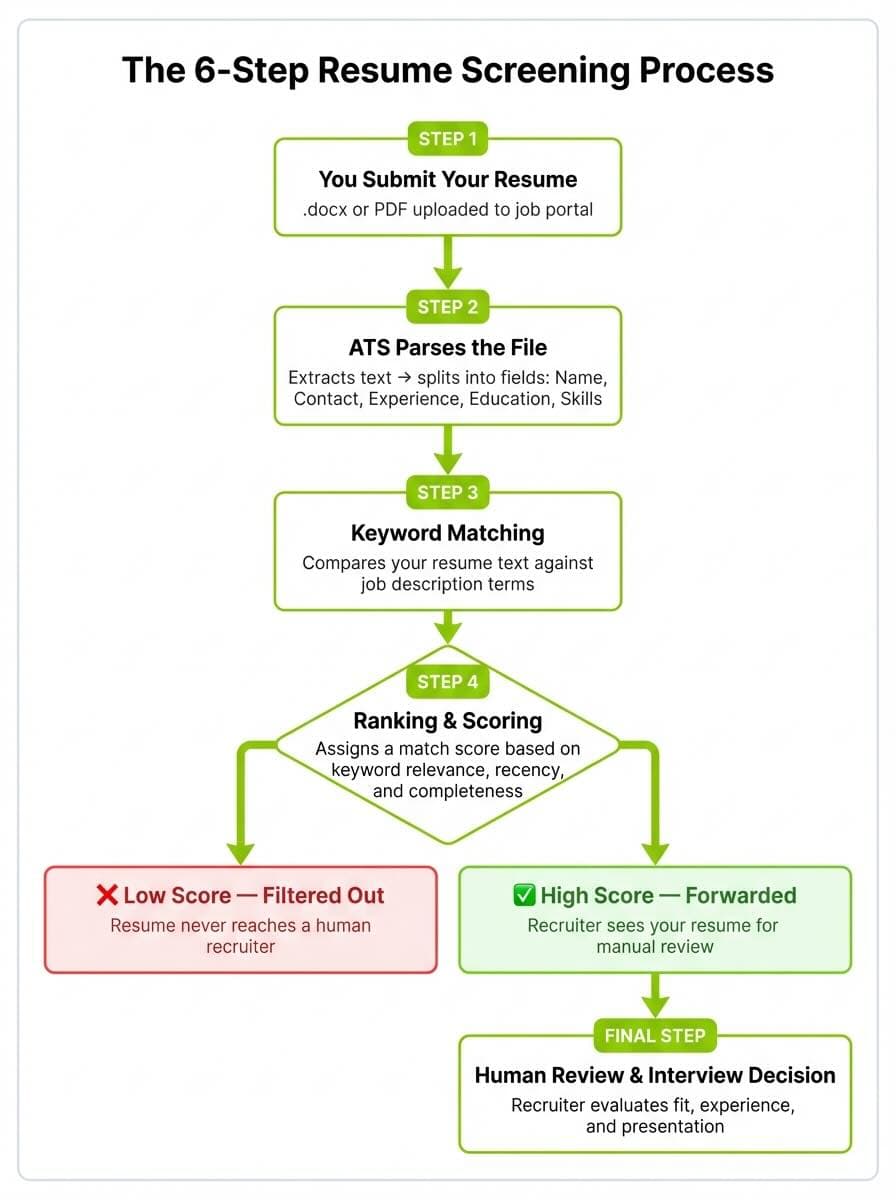
Un ATS décompose votre CV en données structurées comme le nom, les coordonnées, le parcours professionnel et les compétences, puis vous classe par rapport aux autres candidats selon les correspondances de mots-clés et la clarté de la mise en forme. Selon Select Software Reviews, qui agrège des données de SHRM, LinkedIn et d'autres sources sectorielles, près de 99 pour cent des entreprises du Fortune 500 et 75 pour cent des recruteurs utilisent un ATS ou un outil de tri technologique similaire. Le logiciel ne lit pas votre CV comme le ferait une personne. Il recherche des correspondances exactes ou proches avec les termes de l'annonce, organisées sous des titres standards comme «Expérience professionnelle», «Formation» et «Compétences».
Cela signifie qu'un CV utilisant des titres créatifs comme «Là où j'ai eu de l'impact» au lieu de «Expérience professionnelle» peut perdre des données lors de l'analyse. Les mises en page à deux colonnes, les zones de texte et les images intégrées posent des problèmes similaires. Si vous n'êtes pas sûr que votre mise en forme soit sûre, notre outil d'aperçu des polices de CV vous permet de tester le rendu de votre CV dans un format épuré et lisible par un ATS.
La plupart des CV sont éliminés à l'étape 3 ou 4. Les créateurs de CV ATS vous aident à passer les deux.
Pourquoi des candidats qualifiés sont écartés
L'étude «Hidden Workers» de la Harvard Business School a constaté que les systèmes de recrutement automatisés écartent régulièrement des candidats qualifiés, en raison de correspondances de mots-clés rigides et d'exigences de mise en forme, et non par manque de compétences. SHRM a par ailleurs documenté comment les problèmes de configuration des ATS contribuent à cette situation, en notant que la manière dont ces systèmes sont paramétrés rejette souvent des candidats qui pourraient être qualifiés mais qui manquent de certains titres sur le papier. Parmi les raisons fréquentes de rejet: l'absence de mots-clés d'intitulé de poste présents dans l'annonce, des formats de fichier non standards comme .pages ou des PDF graphiques, des en-têtes et pieds de page que le logiciel ATS ne peut pas lire, et des compétences présentées en paragraphe plutôt qu'en liste facile à parcourir.
La solution n'est pas de tromper le système en bourrant votre CV de mots-clés. C'est de présenter vos qualifications réelles dans la structure qu'attend un logiciel ATS. Les créateurs ci-dessous gèrent cela chacun à leur manière, et c'est sur ce point que je les ai évalués.
1. Careerkit, idéal pour l'optimisation ATS par IA
Careerkit est l'outil que j'ai conçu après des années passées à voir des candidats qualifiés rejetés par des logiciels ATS pour des problèmes évitables de mise en forme et de mots-clés. C'est un créateur de CV gratuit dopé à l'IA, pensé spécifiquement autour de la compatibilité ATS.
Prix: Gratuit pour commencer
Sécurité ATS: ★★★★★
Points forts: Puces personnalisées par IA · Modèles testés ATS (Greenhouse, Lever, Workday) · Générateur de lettres de motivation · Photos professionnelles par IA · Profil Career Link
Limites: Bibliothèque de modèles plus réduite que les outils établis
Ce qui distingue Careerkit
Contrairement à la plupart des créateurs gratuits qui vous donnent un modèle et vous laissent vous débrouiller, l'IA de Careerkit analyse votre expérience et génère des puces personnalisées, alignées sur la façon dont un logiciel ATS interprète les réalisations. Le créateur utilise des modèles épurés à une seule colonne qui passent les analyses ATS de manière fiable, et chaque modèle a été testé sur des plateformes ATS courantes comme Greenhouse, Lever et Workday.
Careerkit convient à tous les chercheurs d'emploi, mais il est particulièrement solide pour les personnes en reconversion et les débutants qui ont besoin d'aide pour traduire leur expérience dans un langage compatible ATS. Si vous ne savez pas quelles compétences mettre en avant pour un poste précis, l'outil de génération de compétences peut vous aider à identifier des mots-clés pertinents à partir de l'intitulé du poste visé.
Avantages: Puces personnalisées par IA, modèles testés ATS, gratuit pour commencer, inclut des outils de lettre de motivation et de photo professionnelle, page de profil Career Link.
Inconvénients: Plateforme plus récente avec une bibliothèque de modèles plus réduite que les créateurs établis.
Resume.com propose un créateur de CV épuré et sans fioritures qui fait une chose bien: il vous met rapidement un CV d'aspect professionnel entre les mains.
Prix: Entièrement gratuit
Sécurité ATS: ★★★★☆
Points forts: Modèles épurés · Pas de paywalls cachés · Accompagnement section par section
Limites: Pas de suggestions de contenu par IA · Pas d'optimisation de mots-clés
Ses points forts
La plateforme vous guide à travers chaque section avec des invites et des exemples, ce qui en fait un bon choix pour celles et ceux qui rédigent un CV pour la première fois. Si vous n'avez jamais créé de CV, associez cet outil à notre guide pour rédiger votre premier CV pour un accompagnement pas à pas. Tous les téléchargements sont gratuits, il n'y a pas de paywall caché pour les exports PDF.
Limites
Resume.com ne propose ni analyse de mots-clés ni suggestions de contenu par IA, vous êtes donc responsable d'adapter vous-même votre CV à chaque annonce. Les modèles sont fonctionnels mais basiques, et l'accompagnement pour rédiger de solides puces d'expérience professionnelle est limité.
Avantages: Entièrement gratuit, facile à utiliser, modèles épurés, aucun compte requis.
Pret a decrocher votre emploi de reve ?
Rejoignez plus de 50 000 chercheurs d'emploi qui ont deja transforme leur carriere avec notre createur de CV propulse par l'IA.
Inconvénients: Pas d'assistance IA, pas d'optimisation de mots-clés, personnalisation limitée.
3. Canva, idéal pour le design visuel
Canva est un outil de conception polyvalent doté d'une vaste bibliothèque de modèles de CV. C'est une bonne option si la présentation visuelle compte dans votre secteur, par exemple dans le marketing, le design ou les médias.
Prix: Gratuit avec options premium
Sécurité ATS: ★★★☆☆
Points forts: Immense bibliothèque de modèles · Contrôle total du design · Export PDF gratuit
Limites: De nombreux modèles ne sont PAS compatibles ATS · Pas d'aide sur les mots-clés
Ses points forts
L'éditeur glisser-déposer de Canva vous offre plus de contrôle créatif que n'importe quel créateur de CV dédié. Vous pouvez ajuster librement couleurs, polices et mises en page, et la bibliothèque de modèles est immense. L'export PDF est gratuit, et c'est le format accepté par la plupart des plateformes ATS.
Limites
Voici le hic: de nombreux modèles de CV les plus populaires de Canva ne sont pas compatibles ATS. Les mises en page à deux colonnes, les zones de texte et les éléments décoratifs peuvent casser entièrement l'analyse ATS. Si vous utilisez Canva, tenez-vous-en à des modèles à une seule colonne, évitez les zones de texte et testez le résultat. Pour comparer les polices qui s'affichent proprement sur les plateformes ATS, essayez notre outil d'aperçu des polices de CV.
Avantages: Immense bibliothèque de modèles, grande souplesse de design, téléchargements PDF gratuits.
Inconvénients: De nombreux modèles ne sont pas compatibles ATS, pas d'aide sur les mots-clés, pas de fonctions IA propres au CV.
4. Indeed Resume Builder, idéal pour l'intégration Quick Apply
Le créateur de CV d'Indeed est intégré directement au plus grand site d'emploi au monde. Si vous utilisez déjà Indeed pour chercher un emploi, créer votre CV là-bas vous permet de postuler aux annonces en un clic.
Prix: Entièrement gratuit
Sécurité ATS: ★★★★☆
Points forts: Candidature en un clic aux offres Indeed · Modèles compatibles ATS · Données salariales intégrées
Limites: Personnalisation très limitée · Pas d'assistance à la rédaction par IA
Ses points forts
Le créateur d'Indeed est simple. Vous saisissez vos informations, choisissez un modèle épuré, et votre CV est enregistré dans votre profil Indeed pour des candidatures instantanées. Les modèles sont volontairement simples et compatibles ATS, sans fioritures de design susceptibles de casser l'analyse. Indeed affiche aussi des estimations de salaire et des avis d'entreprise à côté des annonces, ce qui peut vous aider à adapter le langage de votre CV à des employeurs précis.
Limites
Le créateur offre une personnalisation très limitée. Vous ne pouvez ajuster ni la police, ni l'espacement, ni la mise en page au-delà de ce que le modèle prévoit. Il n'y a pas d'assistance IA pour rédiger les puces, et les suggestions de contenu sont génériques. Si vous avez besoin d'aide pour rédiger des puces solides axées sur les réalisations, notre guide d'exemples d'expérience professionnelle présente ce qui fonctionne réellement.
Avantages: Intégré à la recherche d'emploi Indeed, candidature en un clic, gratuit, modèles compatibles ATS.
Inconvénients: Personnalisation minimale, pas d'aide à la rédaction par IA, modèles très basiques.
5. Modèles de CV Google Docs, idéal pour un contrôle total
Google Docs n'est pas un créateur de CV au sens classique, mais ses modèles de CV gratuits constituent une solution de repli fiable si vous voulez un contrôle total sur votre contenu et votre mise en forme.
Prix: Entièrement gratuit
Sécurité ATS: ★★★★☆
Points forts: Modèles épurés à une colonne · Collaboration en temps réel · Aucun problème d'analyse
Limites: Aucun accompagnement de contenu · Pas de suggestions de mots-clés ni d'aide IA
Ses points forts
Les modèles de CV intégrés de Google sont épurés, à une seule colonne et compatibles ATS d'emblée. Comme vous travaillez dans un éditeur de documents standard, il n'y a aucun problème d'analyse: ce que vous voyez est exactement ce que reçoit l'ATS. C'est aussi l'option la plus simple pour collaborer. Si vous travaillez avec un coach de carrière ou un mentor, vous pouvez partager votre CV pour un retour en temps réel.
Limites
Google Docs ne vous offre aucun accompagnement. Il n'y a pas de suggestions de mots-clés, pas d'aide à la rédaction par IA et aucune invite pour améliorer votre contenu. Vous devez savoir à quoi ressemble un bon CV avant de commencer. En cas de doute, parcourez d'abord notre présentation complète des sections d'un CV avant de revenir construire le vôtre. Pour découvrir d'autres créateurs de CV dédiés, consultez notre sélection des meilleurs créateurs de CV pour 2026.
Avantages: Entièrement gratuit, aucun compte au-delà de Google, partage et collaboration faciles, mise en forme ATS propre.
Inconvénients: Aucune fonction propre au CV, pas d'aide IA, exige de savoir à quoi ressemble un bon CV.
Et Jobscan, Zety et les autres créateurs payants?
Sur de nombreux articles listicles, on vous recommande des outils comme Jobscan, Zety et Novoresume. Ils offrent des fonctions utiles, mais leurs formules gratuites sont très restreintes: Jobscan limite les analyses de mots-clés, Zety verrouille les téléchargements PDF derrière un paywall, et Novoresume limite les CV gratuits à une page avec filigrane. Si vous cherchez un créateur réellement gratuit doté de fonctions dopées à l'IA, les cinq options ci-dessus vous en offrent davantage sans réclamer votre carte bancaire.
Comment tirer le meilleur parti de n'importe quel créateur de CV ATS
Un créateur de CV gère la mise en forme et la structure, mais les décisions de contenu restent les vôtres. Ces cinq pratiques s'appliquent quel que soit l'outil choisi.
Adaptez vos mots-clés à chaque annonce
Un logiciel ATS classe les candidats selon la proximité entre leur CV et le langage de la description de poste. Cela ne signifie pas recopier l'annonce mot pour mot, mais repérer les termes précis qu'utilise une entreprise et les refléter naturellement dans vos sections d'expérience et de compétences. Par exemple, si une annonce dit «collaboration transversale» et que votre CV dit «travaillé avec d'autres équipes», l'ATS peut ne pas enregistrer la correspondance. Lisez la description de poste une première fois pour le sens, puis une seconde fois pour extraire les formulations exactes à reprendre. Si vous avez besoin d'aide pour identifier les compétences à inclure, le générateur de compétences de Careerkit peut suggérer des mots-clés pertinents en fonction du poste visé.
Mettez en avant les réalisations, pas les responsabilités
Les recruteurs comme les algorithmes ATS réagissent mieux à des accomplissements mesurables qu'à des listes de tâches. Au lieu d'écrire «Responsable de la gestion d'une équipe commerciale», écrivez plutôt «Direction d'une équipe commerciale de 12 personnes ayant dépassé les objectifs trimestriels de 18 pour cent sur trois trimestres consécutifs». La différence tient à la précision: chiffres, résultats et contexte. Visez trois à quatre puces axées sur les réalisations par poste. Pour d'autres exemples de solides entrées d'expérience, consultez notre guide des puces d'expérience professionnelle.
❌ Avant (faible)
Responsable de la gestion d'une équipe commerciale et du suivi des objectifs trimestriels. Gestion des relations clients et préparation de rapports pour la direction.
✅ Après (fort)
Direction d'une équipe commerciale de 12 personnes ayant dépassé les objectifs de chiffre d'affaires trimestriels de 18 % sur trois trimestres consécutifs. Développement du portefeuille de comptes clés de 15 à 34 clients, générant 1,2 M$ de nouveaux revenus récurrents annuels.
Gardez une mise en forme compatible ATS
Même le meilleur contenu échoue si l'ATS ne peut pas l'analyser. Tenez-vous-en à une mise en page à une seule colonne, utilisez des titres standards comme «Expérience professionnelle», «Formation» et «Compétences», et évitez les zones de texte, les tableaux, les en-têtes et pieds de page ainsi que les images intégrées. Enregistrez votre fichier au format .docx ou en PDF simple, et non en PDF graphique exporté depuis Canva ou Illustrator avec des calques de texte aplatis. Selon un rapport de la Harvard Business School, les filtres de mise en forme rigides des systèmes de recrutement automatisés figurent parmi les principales raisons pour lesquelles des candidats qualifiés sont écartés avant même qu'un humain ne voie leur candidature.
✅ À faire
Mise en page à une colonne Titres standards: «Expérience professionnelle», «Formation», «Compétences» .docx ou PDF simple basé sur le texte Polices standards de 10 à 12 pt (Arial, Calibri, Garamond) Puces simples pour les réalisations
❌ À éviter
Mises en page à deux colonnes ou avec barre latérale Zones de texte, tableaux ou images intégrées Titres créatifs comme «Là où j'ai eu de l'impact» En-têtes et pieds de page contenant les coordonnées PDF exportés depuis Canva ou Illustrator avec des calques de texte aplatis
Ajoutez un lien vers un profil professionnel
Un lien vers votre profil LinkedIn ou vers une page de portfolio de carrière offre aux recruteurs un moyen rapide de vérifier votre parcours et de voir un contexte supplémentaire que votre CV d'une page ne peut couvrir. Selon les propres données de LinkedIn, les utilisateurs disposant d'un profil complet ont 40 fois plus de chances de recevoir des opportunités via la plateforme, un chiffre cité par des centres de carrière universitaires comme raison élémentaire de remplir chaque section. Si vous utilisez Careerkit, votre Career Link remplit ce rôle: c'est une page de profil partageable et toujours à jour qui complète votre CV statique.
Testez avant d'envoyer
Avant d'envoyer une candidature, ouvrez votre CV terminé dans un éditeur de texte brut (Bloc-notes sous Windows, TextEdit en mode texte brut sur Mac). Si le contenu apparaît dans un ordre logique et lisible, sans caractères désordonnés ni sections manquantes, l'ATS l'analysera probablement correctement. Si des sections entières manquent ou sont mélangées, votre mise en forme pose problème. Cette vérification de 30 secondes peut vous éviter d'envoyer un CV qu'un ATS rejettera en silence. Une fois satisfait, créez votre version finale dans Careerkit pour garantir une mise en forme compatible ATS dès le départ.
Quel créateur de CV ATS choisir?
Le bon outil dépend de l'endroit où vous en êtes dans votre recherche d'emploi. Si vous voulez un contrôle total du design et savez déjà à quoi ressemble un bon CV, les modèles Google Docs feront l'affaire. Si vous vivez sur Indeed et voulez des candidatures en un clic, leur créateur intégré est la voie de moindre résistance. Et si la présentation visuelle compte dans votre secteur, Canva fonctionne, à condition de vous en tenir à des modèles à une seule colonne compatibles ATS.
Mais si vous voulez un créateur qui gère à la fois la mise en forme et le contenu, un outil qui utilise l'IA pour adapter vos puces à des descriptions de poste précises, teste ses modèles sur de vraies plateformes ATS et inclut un générateur de lettres de motivation et un profil Career Link sans frais, c'est précisément ce que j'ai conçu Careerkit pour faire.
L'étude «Hidden Workers» de la Harvard Business School a rendu une chose évidente: la plupart des rejets de CV sont évitables. La solution n'est pas un meilleur parcours professionnel. C'est un CV structuré de la façon dont les systèmes automatisés l'attendent. Quel que soit le créateur que vous choisissez, assurez-vous qu'il maîtrise bien cette partie.
Un créateur de CV ATS est un outil qui vous aide à créer un CV mis en forme spécifiquement pour passer les systèmes de suivi des candidatures. Ces créateurs utilisent des modèles compatibles ATS, à une seule colonne, avec des titres standards et une mise en forme propre, afin que le logiciel de tri automatisé puisse analyser correctement vos qualifications. Certains, comme Careerkit, utilisent aussi l'IA pour adapter le contenu de votre CV à des descriptions de poste précises.
Oui, pour la plupart des chercheurs d'emploi, un créateur de CV ATS gratuit suffit. Les facteurs les plus importants pour passer les filtres ATS sont une mise en forme propre, des mots-clés pertinents et des titres standards, autant d'éléments que les outils gratuits gèrent. Des fonctions premium comme des analyses avancées ou des modèles illimités sont utiles mais pas indispensables. La formule gratuite de Careerkit inclut des suggestions de contenu par IA et des modèles testés ATS, ce qui couvre les besoins de la plupart des candidats.
Le test le plus simple est d'ouvrir votre CV dans un éditeur de texte brut comme le Bloc-notes ou TextEdit. Si le contenu apparaît dans un ordre logique et lisible, sans texte désordonné ni sections manquantes, l'ATS l'analysera probablement correctement. Vérifiez aussi que vous utilisez des titres standards comme «Expérience professionnelle», «Formation» et «Compétences», et que votre fichier est enregistré en .docx ou en PDF simple plutôt qu'en PDF graphique avec des calques de texte aplatis.
Oui, mais vous devez être sélectif. De nombreux modèles de CV populaires de Canva utilisent des mises en page à deux colonnes, des zones de texte et des éléments décoratifs qui cassent l'analyse ATS. Si vous utilisez Canva, choisissez un modèle à une seule colonne, évitez totalement les zones de texte et exportez en PDF. Testez le résultat dans un éditeur de texte brut avant d'envoyer. Pour une option plus sûre, un créateur de CV ATS dédié comme Careerkit ou celui d'Indeed produit par défaut une mise en forme compatible ATS.
Il n'y a pas de nombre fixe. L'objectif est de refléter naturellement le langage de l'annonce précise dans tout votre CV, en particulier dans la section des compétences et les puces d'expérience professionnelle. Lisez attentivement la description du poste et identifiez les principales compétences techniques, les outils et les expressions qu'elle emploie, puis assurez-vous que ces termes figurent dans votre CV là où ils correspondent honnêtement à votre expérience. Le bourrage de mots-clés, ou lister des termes que vous ne pourriez pas justifier en entretien, vous nuira plus qu'il ne vous aidera.
Les formats les plus sûrs sont le .docx et les PDF simples basés sur le texte. Évitez les PDF exportés depuis des outils de conception comme Canva, Illustrator ou InDesign, car ils aplatissent souvent le texte en images que le logiciel ATS ne peut pas lire. Si une annonce précise un format préféré, suivez toujours cette instruction. En cas de doute, le .docx est l'option la plus universellement compatible avec les plateformes ATS.
Mettez ces conseils en pratique
Vous connaissez la théorie. Le créateur IA de Careerkit la transforme en CV optimisé ATS, adapté au poste que vous visez.
Nishant Modi is the founder of Careerkit.me and a product builder based in Zürich, Switzerland. With a background in product management, marketing & management consulting, he transitioned into AI entrepreneurship after experiencing the frustration of outdated job search tools firsthand. He built Careerkit to give every job seeker access to professional grade resume tools, the platform has helped over 10,000 candidates create ATS optimized resumes. He writes about resume strategy, hiring trends, and what actually gets people hired.






.png&w=1920&q=75)
