Es gibt vier Wege, Ihren Lebenslauf zu LinkedIn hinzuzufügen, und der richtige hängt von Ihrem Ziel ab. Um sich auf eine Stelle zu bewerben, hängen Sie ihn per Easy Apply an. Um ihn für mehrere Bewerbungen wiederzuverwenden, speichern Sie ihn in Ihren Bewerbungseinstellungen. Damit Recruiter und andere Besucher ihn sehen, fügen Sie ihn Ihrem Abschnitt "Im Fokus" hinzu. Um ihn mit Ihrem Netzwerk zu teilen, posten Sie ihn. Dieser Leitfaden führt Sie Schritt für Schritt durch alle vier, dazu, wie Sie einen Lebenslauf entfernen, und durch die Datenschutz-Abwägungen, bevor Sie einen öffentlich hochladen.
Eines vorab: LinkedIn behandelt einen Lebenslauf, den Sie an Bewerbungen anhängen, getrennt von einem, den Sie in Ihrem Profil anzeigen. Es ist nicht dieselbe Datei, und sie werden nicht synchronisiert. Wählen Sie also die Methode, die zu dem passt, was tatsächlich geschehen soll.
Welche Methode passt zu Ihnen?
Bevor Sie etwas hochladen, machen Sie sich Ihr Ziel klar. Jede Methode legt Ihren Lebenslauf an einem anderen Ort ab, vor einem anderen Publikum.
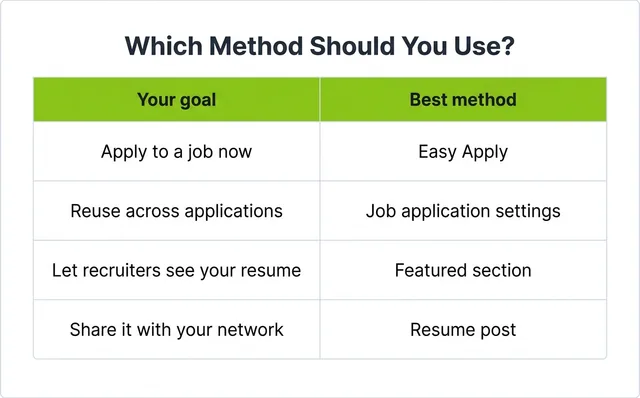
Eine Faustregel: Bewerben Sie sich auf eine konkrete Stelle, nutzen Sie Easy Apply. Wollen Sie gefunden werden, nutzen Sie den Abschnitt "Im Fokus". Bedenken Sie nur: Ein Lebenslauf im Abschnitt "Im Fokus" oder in einem Beitrag ist öffentlich, während einer an einer Bewerbung nur vom jeweiligen Arbeitgeber gesehen wird.
Methode 1: Lebenslauf per Easy Apply anhängen
Das ist der häufigste Grund, einen Lebenslauf zu LinkedIn hinzuzufügen, und der einfachste. Er wird an eine einzelne Bewerbung angehängt und funktioniert am Desktop wie in der mobilen App gleich.
- Öffnen Sie eine Stelle mit der blauen Schaltfläche Easy Apply.
- Klicken oder tippen Sie auf Easy Apply.
- Füllen Sie die erforderlichen Kontaktfelder aus.
- Wählen Sie unter Lebenslauf die Option Lebenslauf hochladen und Ihre Datei. LinkedIn empfiehlt eine PDF- oder Word-Datei unter 2 MB.
- Beantworten Sie etwaige Rückfragen, prüfen Sie und wählen Sie Bewerbung senden.