If you are applying for a job online, do not send a Canva resume.
That is a blunter position than most career advice takes, so this article is built entirely on evidence you can check yourself: the parse-failure documentation published by an applicant tracking vendor, and the formatting guidance from university career offices that have gone as far as naming Canva in print. Two of them name it specifically.
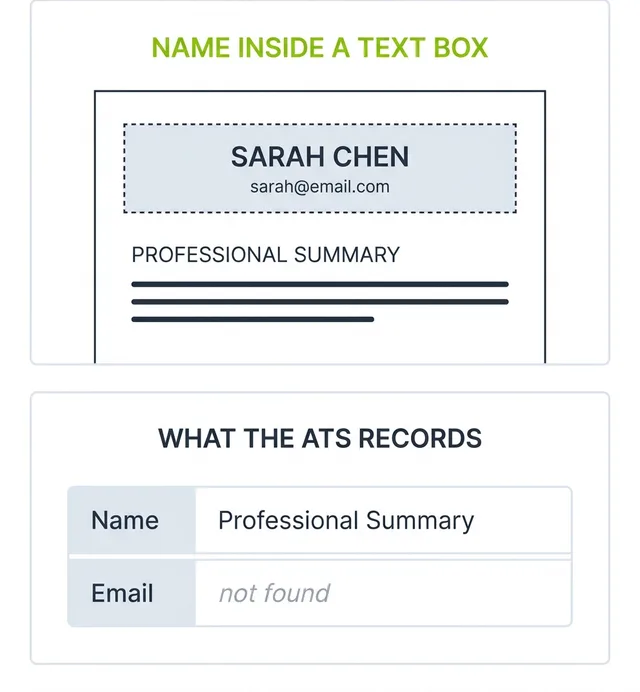
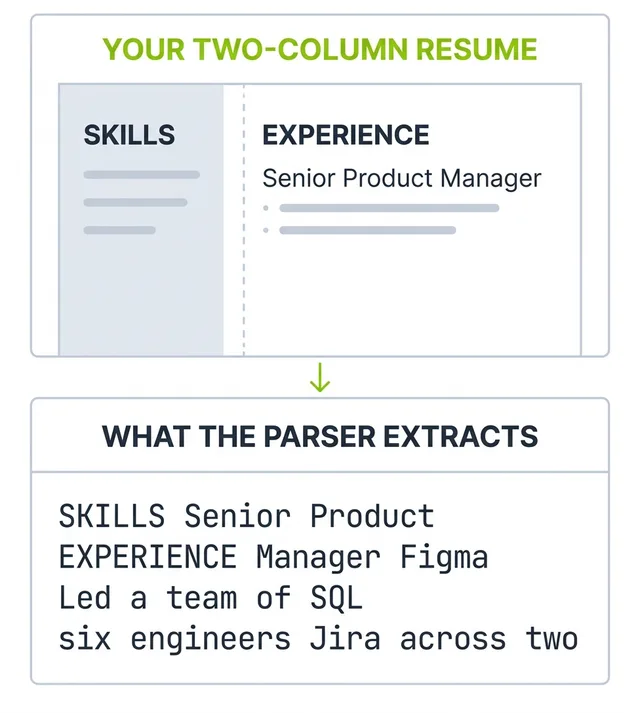
The problem is not that Canva resumes look too creative. It is that the structures Canva templates are built from, floating text boxes, side by side columns, icon rows and rating graphics, are the exact structures resume parsers are documented to fail on. Your resume can look finished on your screen and arrive in the recruiter's database with no name attached to it.
Here is what breaks, how to prove it on your own file in thirty seconds, and what to do instead.
The verdict
Most Canva resume templates will not survive an applicant tracking system, and the failure is silent. Nobody writes to tell you that your file did not parse.
The nuance worth keeping is this: a plain single-column Canva layout with real text and no graphics can parse acceptably. But by the time you have stripped a Canva template back to the point where it parses, you have removed the sidebar, the contact box, the icons, the skill bars and the display font. What remains is an ordinary single-column document, which is the thing you could have started with. The design freedom that brought you to Canva is precisely the part you have to delete.
So the practical answer is the blunt one. For any job posted online, use something built for extraction. Save Canva for the narrow set of cases at the end of this article.
What an applicant tracking system does to your Canva PDF
An ATS does not judge whether your resume looks good. It runs a parser over the file and tries to extract fields: name, email, employer, job title, dates, skills, education. If the parser cannot tell which text belongs to which field, it stores nothing useful, and a recruiter searching for "product manager" never surfaces your record.
Canva is a design canvas. Every element sits in its own positioned container rather than in a continuous document flow. That is a strength for a poster and a liability when the receiving software expects a document that reads top to bottom in one order.