Top ATS Score Checker Tools to Boost Your Resume Success
Discover the top ATS score checker tools to optimize your resume, improve keyword alignment, and land more interviews. Includes research-backed tips and before/after examples. Start improving today.
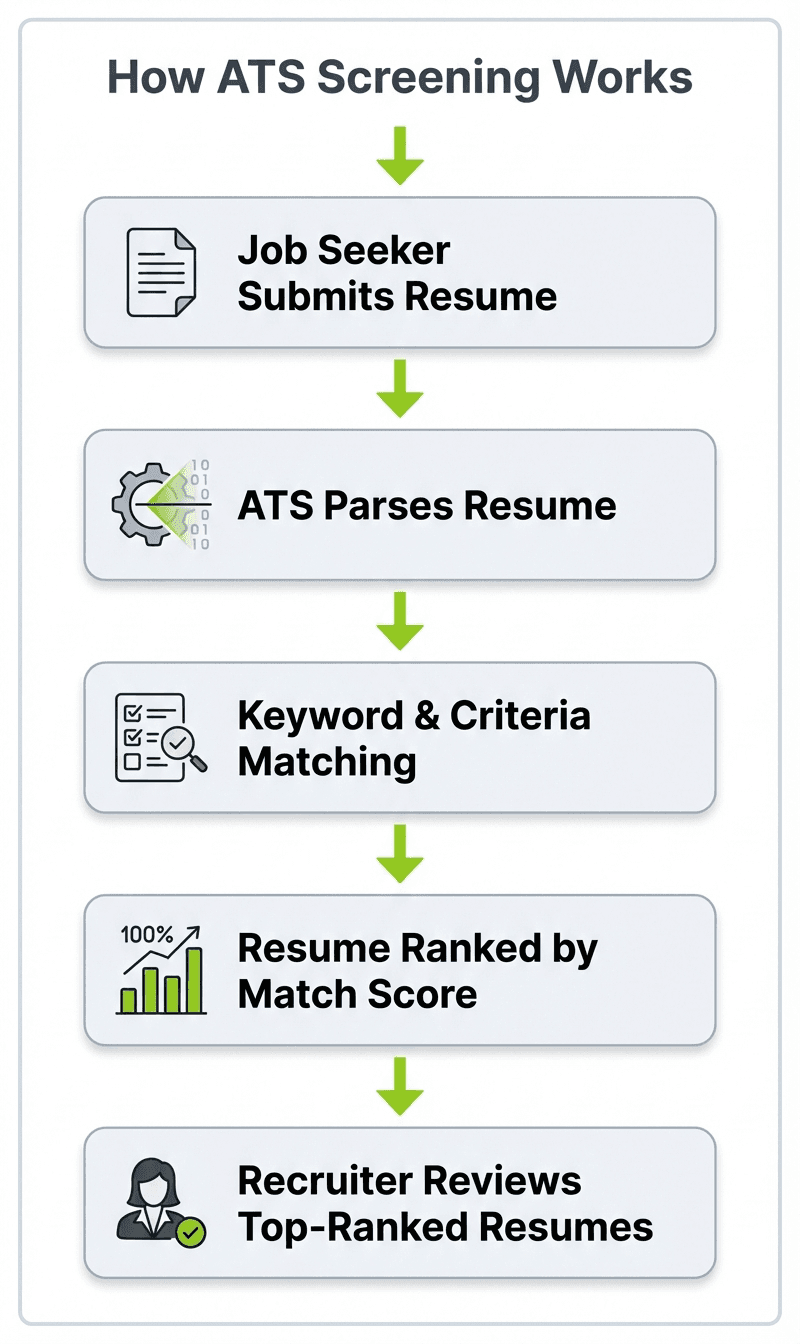
In today’s competitive job market, crafting a resume that stands out is more important than ever. However, before your resume even reaches a hiring manager’s desk, it often faces an initial gatekeeper: the Applicant Tracking System (ATS). These automated systems scan, parse, and rank resumes based on keywords, formatting, and relevance to the job description. A 2021 Harvard Business School study found that 88% of employers acknowledged their ATS was filtering out qualified candidates because their resumes didn’t match exact search criteria — not because the software auto-rejected them, but because keyword alignment and formatting issues caused those resumes to rank too low for overloaded recruiters to reach. If you’re starting from scratch, our guide on walks you through building a strong foundation before optimizing for ATS.
Applicant Tracking Systems are software platforms used by companies of all sizes to streamline their hiring process. According to Select Software Reviews, 75% of companies use an ATS to manage hiring, and that number rises to over 98% among Fortune 500 companies.
Given that a large majority of resumes are filtered out by ATS software, having an ATS-friendly resume can significantly increase your chances of landing an interview. A field experiment published in Management Science by MIT Sloan researchers, involving nearly half a million job seekers, found that those who received algorithmic writing assistance on their resumes were 8% more likely to be hired and earned 8.4% higher wages on average.
Therefore, understanding how ATS works and tailoring your resume accordingly is essential for job seekers aiming to maximize their success.
How ATS Score Checkers Help You Get Noticed
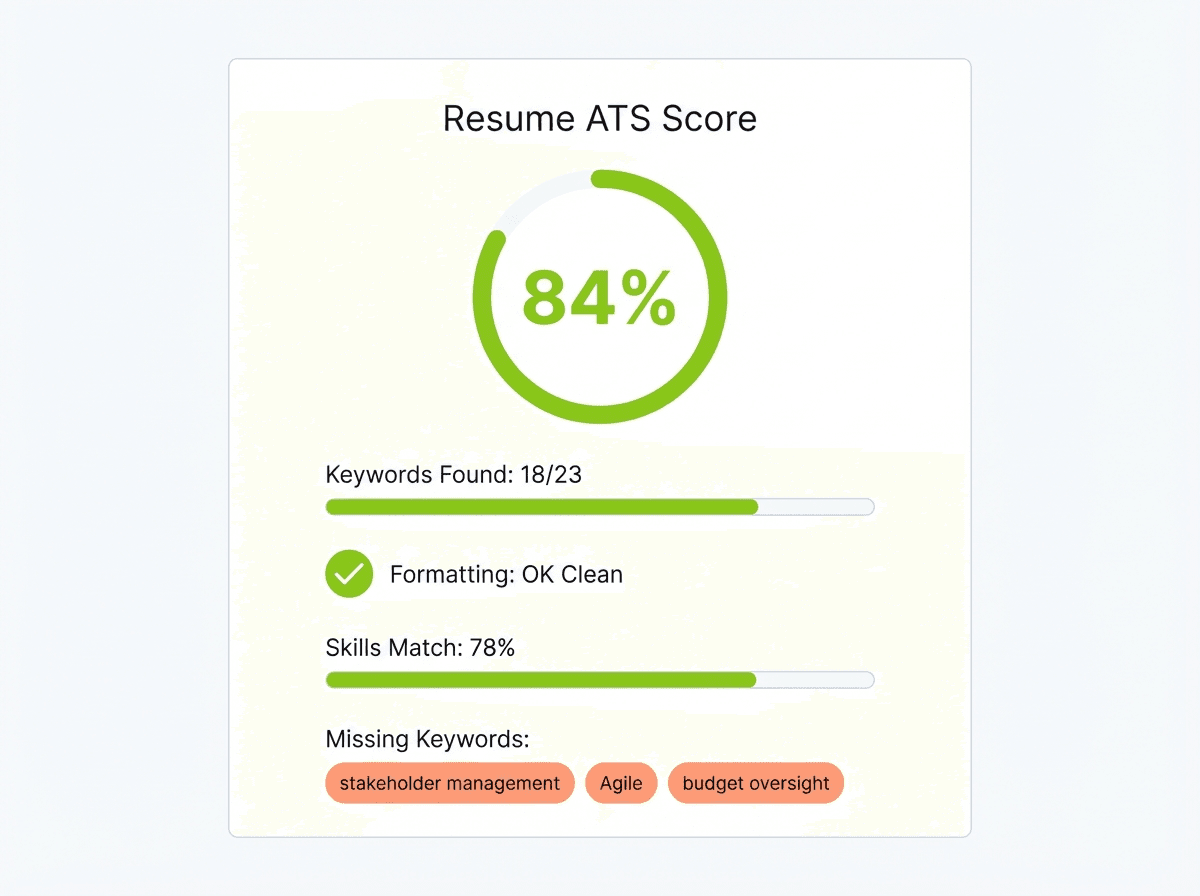
ATS score checker tools analyze your resume against specific job descriptions and ATS criteria, providing a score that reflects how well your resume will perform in automated screenings. Most ATS checker tools recommend aiming for a match score of 80% or higher against a specific job description. While there’s no universal “pass” threshold — since every company configures their ATS differently — hitting 80% typically means strong keyword alignment and good formatting compatibility.
These tools highlight areas for improvement, such as missing keywords, formatting issues, or irrelevant content, allowing you to optimize your resume before submitting it. Using an ATS score checker can increase your likelihood of passing ATS filters and landing more interviews.
Benefits of Using ATS Score Checkers
Beyond just scoring, many ATS checkers offer actionable insights and suggestions to improve your resume’s effectiveness. Some even use advanced AI to compare your resume directly with the job listing, ensuring a tailored match that resonates with both the ATS and hiring managers.
Research published in Management Science (NBER Working Paper) shows that job seekers who received algorithmic writing assistance on their resumes experienced an 8% increase in their probability of being hired. The study, conducted with nearly 480,000 job seekers, also found those who received help earned 8.4% higher wages — demonstrating the tangible value AI-powered resume tools provide.
Top ATS Score Checker Tools to Consider
With numerous ATS score checkers available, choosing the right one can be overwhelming. Below are some of the most reputable and effective tools that can help you optimize your resume for ATS success.
1. SkillSyncer
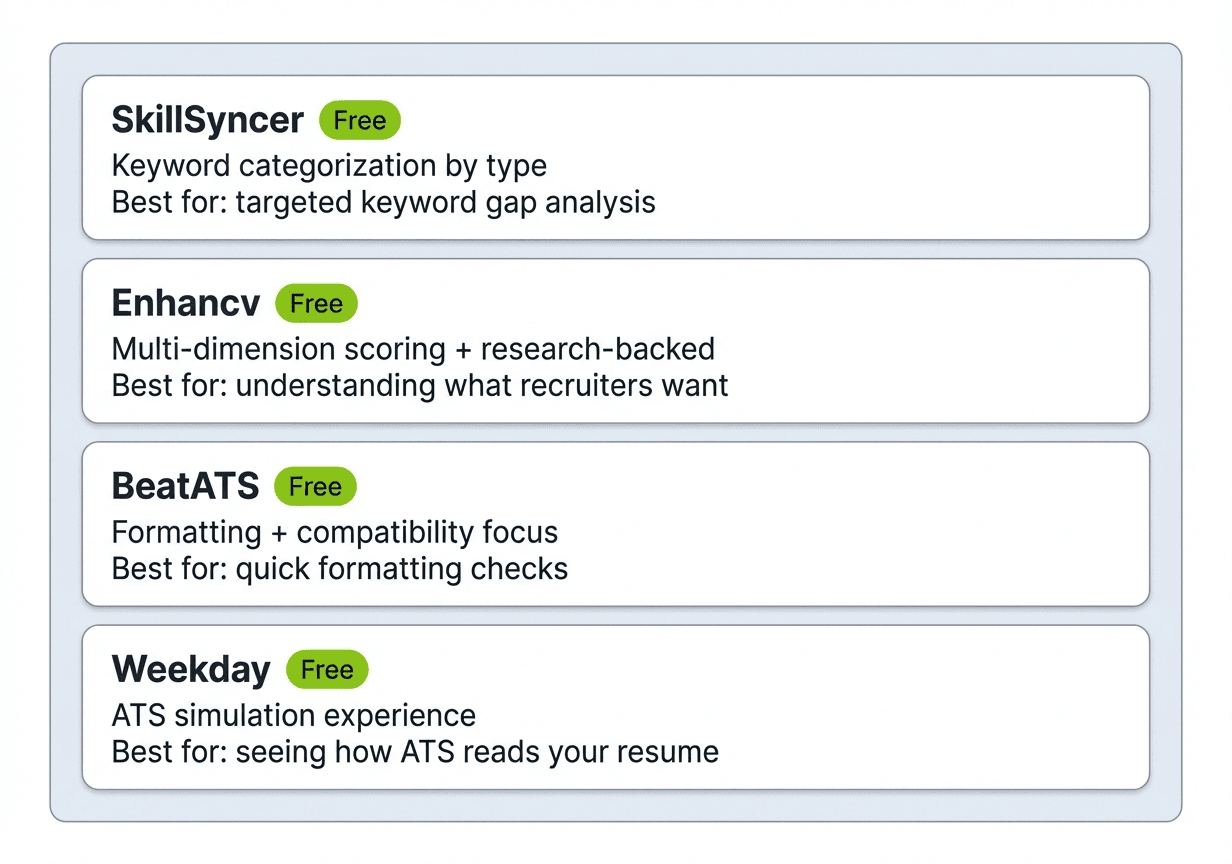
SkillSyncer is a free ATS resume scanner that compares your resume directly against a specific job description. It highlights missing keywords and skills, categorizes them by importance, and shows you exactly where gaps exist between your qualifications and the job requirements.
What sets SkillSyncer apart is its keyword categorization system. Rather than giving you a single score, it breaks down missing terms into hard skills, soft skills, and other keywords, so you can prioritize which gaps to address first. For job seekers applying to multiple roles, this level of detail makes the tailoring process much faster and more targeted.
According to a 2021 Harvard Business School study, 88% of employers acknowledged that qualified candidates were being filtered out because their resumes didn’t match exact search criteria. Tools like SkillSyncer help you close that gap by showing precisely which terms the ATS will be looking for.
If you want to go a step further and build an ATS-optimized resume from scratch, Careerkit’s resume builder uses AI to tailor your content to each job description automatically.
2. Enhancv Resume Checker
Enhancv offers a free ATS resume checker that evaluates your resume across multiple dimensions including content quality, formatting, ATS compatibility, and overall impact. Rather than just a pass/fail score, it provides a detailed breakdown with specific suggestions for improvement.
What makes Enhancv particularly credible is their original research. In a 2025 study published on HR.com, Enhancv interviewed 25 U.S.-based recruiters across multiple industries and found that 92% of recruiters confirmed their ATS platforms do not auto-reject resumes based on formatting or design. The real culprit is volume — high-demand roles attract hundreds or even thousands of applicants within days, making keyword alignment and clarity more important than ever.
Their tool also checks for common formatting pitfalls that trip up ATS parsers, such as multi-column layouts, embedded graphics, and non-standard heading labels. If your resume passes Enhancv’s checks, you can be reasonably confident it will parse correctly across most major ATS platforms like Workday, iCIMS, and Greenhouse.
3. BeatATS
BeatATS provides a free ATS resume checker that helps identify common pitfalls that cause resumes to be rejected by ATS systems. With corporate job postings receiving an average of 250 applicants according to The Times, standing out from a crowded field means ensuring your resume parses correctly and contains the right keywords. BeatATS focuses on helping your resume clear this critical first hurdle.
The tool offers straightforward feedback on keyword usage, formatting, and overall ATS compatibility, making it an excellent starting point for job seekers. Moreover, BeatATS includes a feature that allows users to compare their resumes against successful samples from their industry, giving them a clearer understanding of what works and what doesn’t.
Bereit fuer Ihren Traumjob?
Schliessen Sie sich 50.000+ Jobsuchenden an, die ihre Karriere bereits mit unserem KI-gestuetzten Lebenslauf-Builder verwandelt haben.
Weekday’s resume checker emphasizes the importance of a high ATS score in increasing interview opportunities. Their tool not only scores your resume but also provides personalized recommendations to enhance your chances of passing ATS filters.
With a focus on practical improvements, Weekday helps job seekers refine their resumes to meet ATS standards effectively. Additionally, the platform offers a unique feature that allows users to simulate the ATS scanning process, providing a real-time experience of how their resumes will be processed.
Key Features to Look for in an ATS Score Checker
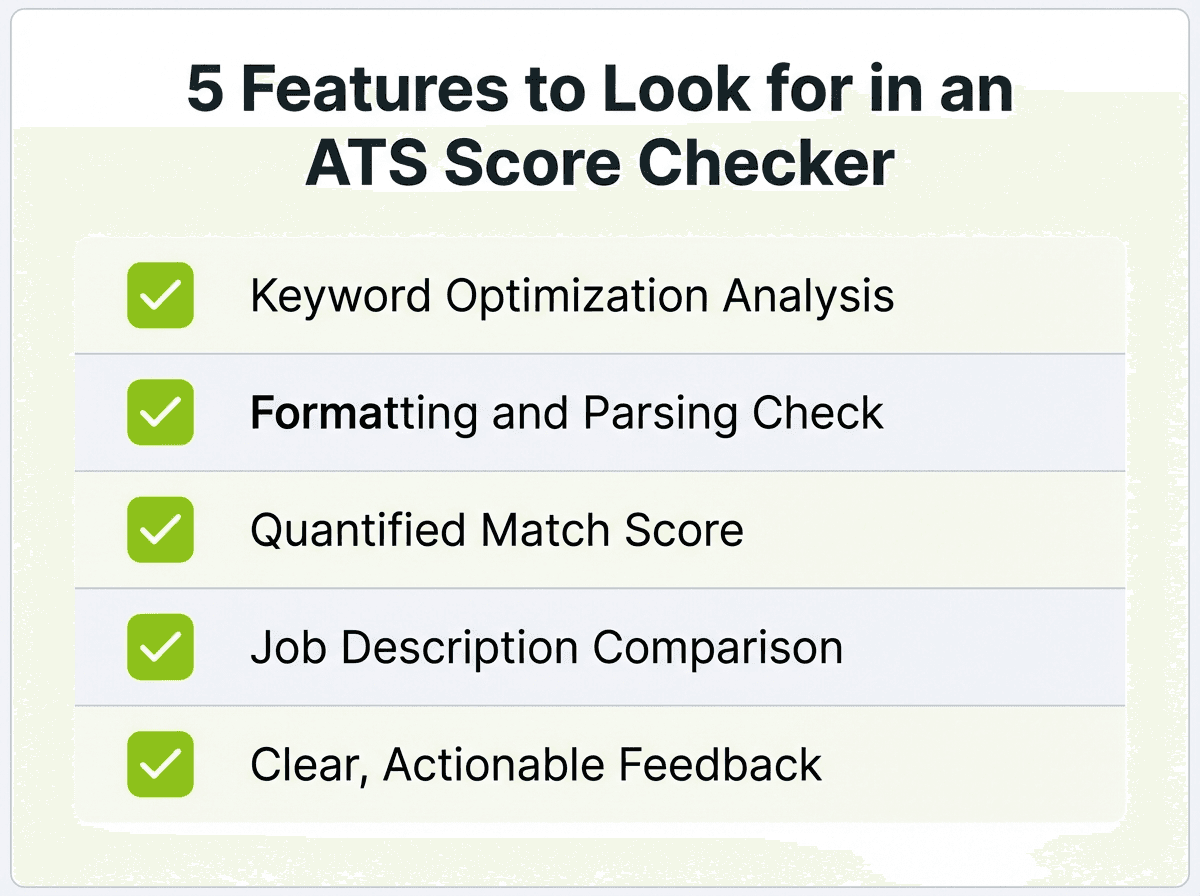
Not all ATS score checkers are created equal. Some only give you a generic number, while others provide detailed, actionable breakdowns that actually help you improve. When evaluating which tool to use, consider these five features that separate the useful tools from the superficial ones.
Keyword Optimization
The tool should analyze your resume against the specific job description you’re targeting, identifying both missing and underused keywords. Good ATS checkers go beyond simple keyword counting — they identify hard skills (like “Python” or “Salesforce”), soft skills (like “cross-functional collaboration”), certifications, and job title variations that the ATS may be searching for. Some tools also differentiate between “must-have” keywords that appear in the requirements section and “nice-to-have” terms from the preferred qualifications, helping you prioritize which gaps to fill first. If you’re not sure which skills to include, try our free resume skills generator — paste in a job description and it will suggest relevant keywords.
Formatting Analysis
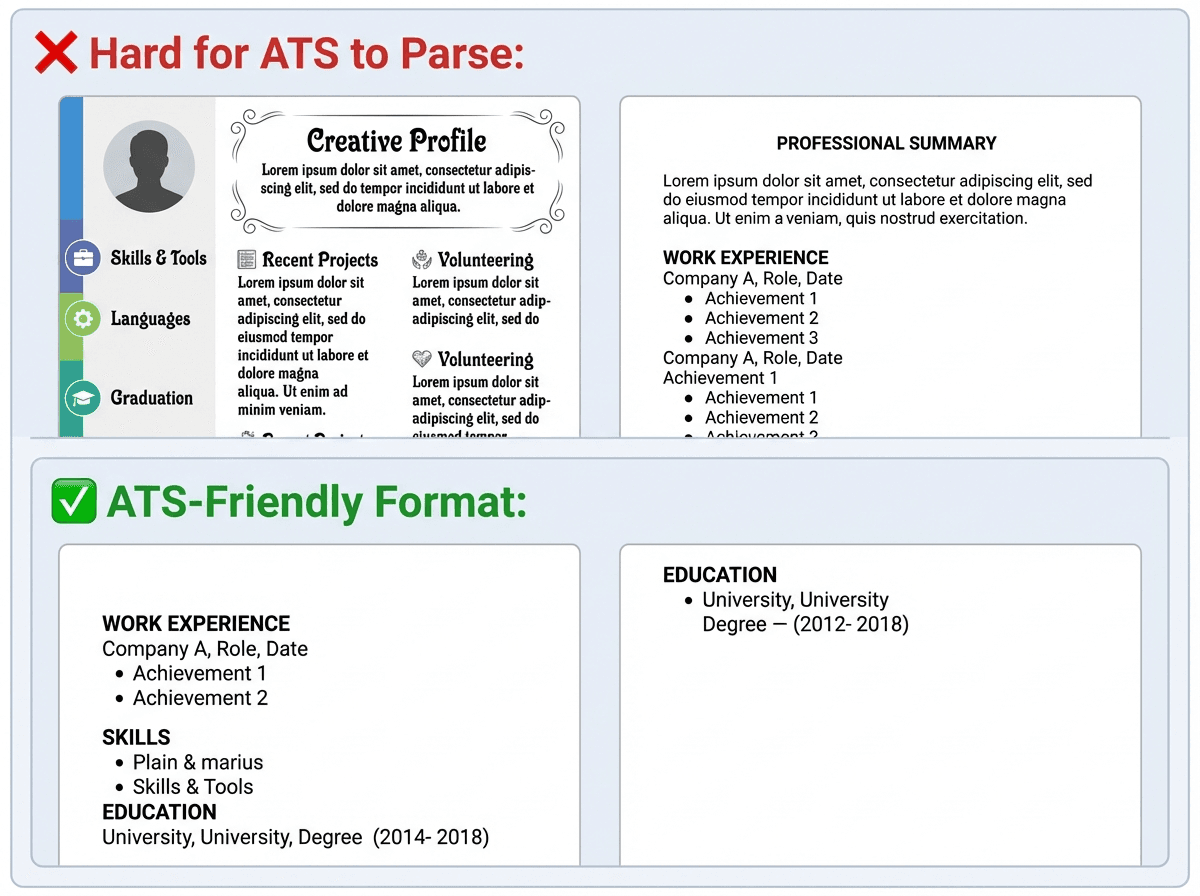
ATS systems often struggle with complex formatting elements like multi-column layouts, text boxes, embedded images, custom icons, and decorative fonts. A good checker will flag these formatting issues and show you specifically what’s causing parsing problems. For example, a two-column resume may look polished to a human, but many ATS parsers read left-to-right across both columns simultaneously, scrambling your work history with your skills section. The best formatting checkers will test your resume against common ATS platforms like Workday, Greenhouse, and iCIMS, and show you how each one interprets your content.
Score and Detailed Feedback
A clear, quantifiable ATS score gives you a starting benchmark, but the real value comes from the detailed feedback that accompanies it. Look for tools that break your score into categories — keyword match, formatting, section structure, and overall readability — so you know where to focus your effort. A score of 65% with feedback telling you “you’re missing 8 keywords from the job description” is far more useful than a score of 65% with no context. The best tools also show you exactly which keywords are missing and where in your resume they should go.
Job Description Matching
The most useful ATS checkers let you paste in a specific job description and then compare your resume directly against it, rather than evaluating your resume in isolation. This side-by-side comparison reveals gaps that a generic resume checker would miss. For instance, a job posting for “Senior Data Analyst” might specifically require “Tableau,” “SQL,” and “cross-functional stakeholder reporting” — terms you might have on your resume in slightly different phrasing. A job-description-matching tool will catch those near-misses and suggest where to adjust your language for a closer match.
User Experience
When you’re applying to 10 or more jobs per week, every minute counts. Look for tools that let you upload your resume and paste a job description with minimal friction — no lengthy sign-up process, no paywall before you see results. The best tools deliver results within 60 seconds and let you iterate quickly: make a change, re-scan, and see your score improve in real time. Some tools also offer browser extensions or integrations that let you scan directly from job boards like LinkedIn or Indeed, saving you the step of copying and pasting.
Tips for Maximizing Your ATS Score
Running your resume through an ATS checker is a strong first step, but the score is only as good as the changes you make afterward. The following tips address the most common reasons resumes score poorly — from non-standard headings that confuse parsers to formatting choices that break ATS readability. Each one includes a concrete example so you can see exactly what to change.
Use Standard Headings
Stick to conventional section titles like “Work Experience,” “Education,” and “Skills.” Unusual headings may confuse ATS parsing algorithms. For a detailed breakdown of what each section should contain, see our guide to the anatomy of a resume.
❌ Before (non-standard headings):
My Career Journey — Marketing Manager at TechCo, 2021–2024
What I Bring to the Table — Digital marketing, SEO, Google Analytics
Where I Studied — University of Michigan, B.A. Communications
✅ After (ATS-friendly headings):
Work Experience — Marketing Manager at TechCo, 2021–2024
Skills — Digital Marketing, SEO, Google Analytics, Content Strategy
Education — University of Michigan, B.A. Communications, 2017
Incorporate Keywords Naturally
Identify keywords from the job description and integrate them seamlessly into your resume. Avoid keyword stuffing, which can appear unnatural. The most effective place to weave in keywords is your work experience bullet points — our guide to top work experience bullet point examples shows how to write achievement-driven lines that naturally include relevant terms.
Job description excerpt: “Seeking a digital marketing manager with experience in SEO strategy, Google Analytics, paid media campaigns, and content marketing.”
❌ Before (keyword-stuffed): Responsible for SEO strategy. Used Google Analytics for SEO strategy. Managed paid media campaigns and content marketing using SEO strategy.
✅ After (keywords integrated naturally): Led SEO strategy overhaul that increased organic traffic by 47% over six months, using Google Analytics to identify high-intent keyword gaps. Managed $120K in quarterly paid media campaigns across Google Ads and Meta, while developing a content marketing calendar that produced 15 blog posts per month.
How Keyword Integration Works in Practice
Here are three examples showing how to extract keywords from a job description and weave them into your bullet points.
Example 1 — Project Manager role
Job description asks for: “Agile methodology, stakeholder management, cross-functional teams, budget oversight”
Managed a cross-functional team of 12 engineers and designers using Agile methodology to deliver a $2.3M platform migration on time and 8% under budget, presenting weekly progress reports to C-suite stakeholders.
One bullet, four keywords — each used in context with a measurable result.
Example 2 — Customer Success Manager role
Job description asks for: “customer retention, onboarding, CRM tools, upsell revenue”
Redesigned the customer onboarding process in Salesforce (CRM), reducing time-to-value by 30% and improving annual customer retention from 82% to 91%. Identified upsell opportunities during quarterly business reviews, generating $340K in expansion revenue.
Example 3 — Data Analyst role
Job description asks for: “SQL, data visualization, Tableau, business intelligence, reporting”
Built automated reporting dashboards in Tableau that replaced 15 hours of weekly manual data pulls, delivering business intelligence insights to the leadership team via SQL-driven data visualization pipelines.
Keep Formatting Simple
Avoid tables, text boxes, images, and graphics. Use standard fonts and bullet points to ensure ATS can read your resume without errors. Choosing the right font also matters — sans-serif fonts like Calibri or Arial parse more reliably across ATS platforms. Use our resume font preview tool to see how different fonts render on your resume.
❌ Formatting that breaks ATS parsing:
- Two-column layouts
- Text boxes or shapes
- Embedded images, logos, or icons
- Headers/footers containing key contact info
- Fancy fonts like Brush Script or Papyrus
✅ Formatting that parses cleanly:
- Single-column layout
- Standard fonts (Calibri, Arial, Georgia)
- Contact info in the main body of the document
- Simple bullet points (round dots, not custom icons)
- Consistent date formatting (Jan 2023 – Present)
Choose the Right File Format
Submitting your resume as a .docx or .pdf file is generally safe, but check the job posting for specific instructions. Some ATS software prefers one format over another.
Tailor Each Resume
Customize your resume for each job application. ATS score checkers that compare your resume to the specific job description can be invaluable for this. For a full comparison of the best tools to help you build tailored resumes quickly, check out our roundup of best resume builders in 2026.
AI-Powered Resume Builder — Create Your ATS-Optimized Resume in Minutes. Build Your Resume
The Future of ATS and Resume Screening
Advancements in AI and machine learning are transforming how resumes are screened. A 2024 study published on arXiv demonstrated that an automated resume screening framework using Large Language Models (LLMs) completed the screening process 11 times faster than traditional manual methods, while achieving an 87.7% F1 accuracy score in resume classification. This kind of AI-driven screening means recruiters can process larger applicant pools faster — making keyword optimization and clean formatting even more critical for job seekers.
This evolution means that ATS systems will become even more sophisticated, emphasizing the need for job seekers to stay updated with best practices and leverage AI-powered tools to maintain a competitive edge.
Conclusion
Optimizing your resume for ATS isn’t about gaming the system — it’s about presenting your qualifications clearly enough that both software and human recruiters can find what they’re looking for. With 88% of employers acknowledging that qualified candidates get filtered out due to keyword mismatches, the stakes are real.
The most effective approach combines three steps: use an ATS checker to identify gaps between your resume and the job description, integrate missing keywords naturally into your work experience and skills sections, and keep your formatting clean and parseable.
Whether you use SkillSyncer, Enhancv, BeatATS, or Weekday’s checker to audit your resume, the key is to tailor for each application and focus on specific, measurable results. And if you want a tool that handles the tailoring for you, Careerkit’s AI-powered resume builder optimizes your content for ATS automatically while keeping it compelling for human recruiters.
Most ATS checker tools recommend aiming for a match score of 80% or higher against a specific job description. However, there’s no universal threshold since every company configures their ATS differently. A score of 80% typically indicates strong keyword alignment and formatting compatibility. Focus on matching the specific terms from each job description rather than chasing a magic number.
According to a 2025 Enhancv study published on HR.com, 92% of recruiters said their ATS platforms do not auto-reject resumes. Most ATS systems rank and sort candidates rather than reject them outright. The real barrier is volume — popular job postings can attract hundreds of applicants, and recruiters typically review top-ranked resumes first. Knockout questions (like work authorization) may auto-reject, but content-based auto-rejection is rare.
No. This widely cited statistic has been traced back to Preptel, a defunct company that went out of business in 2013 without ever publishing any research methodology. Career experts and recruiter surveys have debunked it. The reality is that ATS systems filter and rank resumes, and many qualified candidates rank low due to keyword mismatches or formatting issues — not because software is auto-rejecting them.
Both formats are generally accepted, but check the job posting for specific instructions. Word (.docx) files tend to parse more reliably across most ATS platforms. If you submit a PDF, avoid scanned image PDFs — use a text-based PDF that allows copy-pasting. Some older ATS platforms struggle with PDFs that have complex formatting, so .docx is often the safer choice.
You shouldn’t. Each job description uses different keywords and prioritizes different skills. ATS systems match your resume against the specific terms in that posting. A resume optimized for a “Marketing Manager” role may score poorly for a “Brand Strategist” position, even if the jobs are similar. Use an ATS checker to compare your resume against each job description, and adjust your keywords, skills section, and summary accordingly.
Setzen Sie diese Tipps in die Praxis um
Sie kennen jetzt die Theorie. Der KI-Builder von Careerkit macht daraus einen ATS-optimierten Lebenslauf, zugeschnitten auf Ihre Wunschstelle.
Nishant Modi is the founder of Careerkit.me and a product builder based in Zürich, Switzerland. With a background in product management, marketing & management consulting, he transitioned into AI entrepreneurship after experiencing the frustration of outdated job search tools firsthand. He built Careerkit to give every job seeker access to professional grade resume tools, the platform has helped over 10,000 candidates create ATS optimized resumes. He writes about resume strategy, hiring trends, and what actually gets people hired.